

Table of Contents
Key takeaways
- Customer success doesn’t scale when knowledge lives in individual conversations rather than reusable systems.
- The core problem is inconsistent onboarding, content that can’t keep pace with product changes, and no clear connection between education and revenue outcomes.
- Shifting to structured customer education can solve this: capture what your CSMs already teach, design learning paths, and integrate completion data into health scores you already track.
Customer success teams don’t fail because they lack effort.
When executives say “our CS doesn’t scale” what they usually mean is this: we’ve hired smart people to answer the same question again and again:
- The same onboarding walkthroughs for every new account
- The same “how do I…” questions answered across Zoom, email, and Slack
- Enablement materials that go out of date faster than anyone can update them
- CSMs with calendars so packed they never get to the strategic work they were hired for
The instinct is to hire more people. What usually happens? The same manual work just spreads across more people. As long as success lives in individual conversations instead of reusable systems, scale will always feel just out of reach.
This post explains why customer success stays stuck, how to scale customer success with education, and what it actually looks like to make the shift.
Five reasons why customer success doesn’t scale, and how customer education can help
Customer education doesn’t magically solve every problem your CSMs face. But it does give you a way to redesign how knowledge moves, instead of just throwing more people at the problem.
What follows are the most common reasons customer success doesn’t scale and, for each one, what it actually looks like to fix it with education.
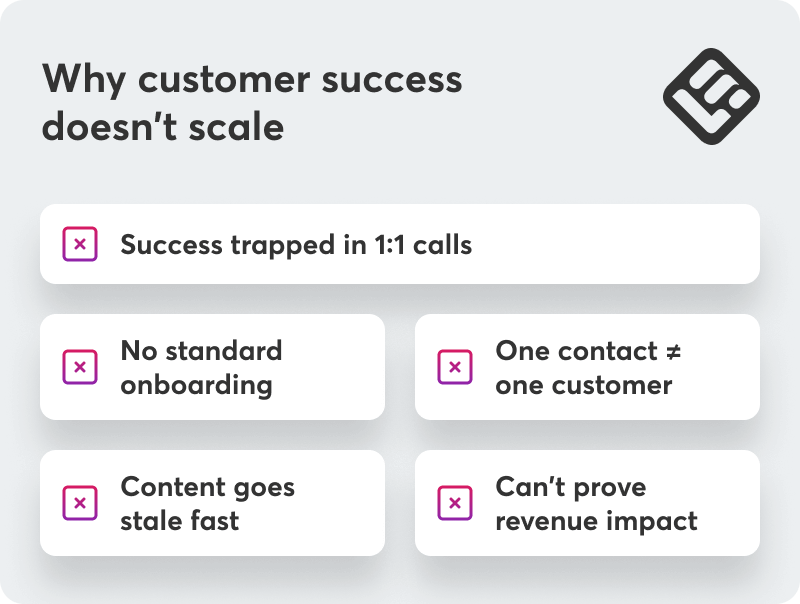
1. Success is trapped in individual conversations
In a lot of organizations, customer success is really “live education over Zoom.”
The same core stories are told again and again: how to set up the product, which mistakes to avoid, what a healthy workflow looks like. CSMs become walking knowledge bases, and the only way to access that knowledge is to book their time. That works when you have 20 customers. But when you reach 200, it breaks.
What changes when knowledge escapes the calendar
Education gives you a way to capture those high-value explanations once and reuse them many times, turning them into always-on customer training.
In practice, that means:
- Turning your standard walkthroughs into short, focused lessons (5–10 minutes)
- Building a simple “Start here” path for new admins and users, which covers the basics before they ever join a call
- Using short quizzes or checklists to confirm they’ve actually grasped key concepts
The goal isn’t to get rid of calls. It’s to change what those calls are for. If customers come in having already seen how things work, an onboarding call becomes a conversation about strategy, not setup. You discuss their goals and what success should look like for them instead of how to send their teammates invites to join.
2. Onboarding isn’t standardized, so every CSM invents their own version
Ask five CSMs how they onboard customers, and you’ll often get five different answers. There might be a shared deck or checklist somewhere, but what actually happens depends on who’s leading the call, how much time they have, and what the customer happens to ask.
The inconsistency doesn’t end there. Enterprise customers get a bespoke experience while smaller accounts often get no more than a link to the help center. That’s not a deliberate choice—it’s what happens when onboarding exists as a series of live interactions rather than a defined system.
Why defining outcomes matters more than documenting calls
Education helps you to define onboarding in terms of learning outcomes rather than meeting agendas.
In practice, that looks like:
- Deciding what people need to know and be able to do after 7, 30, and 90 days
- Designing separate journeys for admins, everyday users, and internal champions
- Expressing those journeys as structured learning paths rather than a series of calls
Kick-offs and workshops don’t disappear. They just stop being the entire system. A new admin might complete “Admin Essentials” before the first strategy session, while end users go through a role-specific basics path tied to their actual workflows.
💡A platform like LearnWorlds handles this through built-in authoring tools that let you structure content quickly, bundle courses into learning programs with prerequisites and knowledge checks, and track completion in the Reports Center so you can see which customers have actually finished the pieces that matter.
3. Content can’t keep up with the product
Even when teams manage to record trainings and write guides, they run into a different problem: documentation goes out of date fast.
Two product updates later, that carefully scripted video is more confusing than helpful. CSMs stop trusting the official materials and fall back to what feels safer: “Let’s jump on a quick call to show you.”
The issue isn’t that people don’t care about keeping content current. It’s that most content systems aren’t designed for change. One UI update requires re-recording an entire video, updating screenshots in six different docs, and hoping you caught everything.
How to design content for change
The fix isn’t creating more content. It’s structuring it so updates don’t require rebuilding everything:
- Break long trainings into short, modular lessons that can be updated independently
- Identify the “evergreen” explanations (concepts, workflows) that should live as reusable blocks you can reference across multiple courses
- Set a simple review rhythm (eg, monthly or quarterly) where someone owns checking what needs updating
💡LearnWorlds offers content cloning with sync capabilities. When you clone a course, changes to the source automatically update in all synced copies, letting you maintain consistent training across multiple customer cohorts without manual rework.
For more on how to simplify content management and scale learning through modular design, watch our webinar “Modular training: Scale fast, update easy, engage more.”
4. Your onboarding assumes one contact per customer (but B2B doesn’t work that way)
B2B doesn’t operate on a 1:1 basis. One customer account is often twenty people across three departments in four countries. If your onboarding flow assumes a single point of contact enrolling themselves, it breaks the moment your product expands within an organization:
- A new region goes live and needs training
- A large enterprise client purchases seats for multiple business units
- Different roles (admins vs. end-users) need different training paths
Without the right structure, every one of those scenarios looks like another mountain of manual work for CS: enrollments, reminders, ad-hoc reports, extra calls.
Designing for scale, not individual enrollment
The pattern most customer education teams adopt:
- Self-serve by default: Most users onboard themselves via standard registration or SSO
- Segment deliberately: Tags, user groups, and multiple after-login pages are used to guide different audiences to the right content
- Delegate when needed: For larger accounts, specific client-side users can be assigned roles that let them manage enrollments and track progress for their teams
💡LearnWorlds supports this through User Groups combined with role-based delegation, and SSO integrations that pass user attributes into the platform to support structured onboarding flows.
The goal is simple: let most users onboard themselves instantly, while supporting enterprise accounts that need controlled, role-based administration.
5. You can’t show how education impacts revenue
Even when customer success teams do a lot of training, they often struggle to answer a basic question: Does any of this actually affect renewals and expansion?
Completion rates and attendance numbers are easy to pull. They’re also not reliable predictors of whether an account will grow or churn. That makes it hard to justify more investment in customer education, which in turn keeps customer success stuck in the cycle of manual work and ad-hoc enablement.
Connecting learning milestones to business outcomes
The key is linking learning milestones to business outcomes.
You don’t need a perfect attribution model on day one. You can start with simple hypotheses:
- Accounts where at least one admin completes “Core Setup” are more likely to launch successfully
- Accounts where 70–80% of key users complete “First 30 Days” are less likely to churn in year one
- Accounts with a certified internal champion are more likely to expand into new use cases
Once you’ve defined these milestones, you track them alongside your health scores and renewal data. Over time, patterns emerge: maybe certified admins correlate strongly with upsell, or poor early-course engagement shows up in later churn.
A learning platform with solid reporting makes this practical. Teams can export completion and engagement data from LearnWorlds or send it to external systems where it can be combined with customer data in a CSM to analyze the relationship between training activity and customer behavior.
Watch our webinar “Grow your funnel: How to use customer education to attract and retain customers” to learn about how you can use the LearnWorlds – HubSpot integration to attract leads, nurture prospects, and close more deals.
What it looks like to stop doing education manually
Customer education is how you give your team a scalable way to share what they know, and your customers a reliable way to learn it.
Shifting from CSM calls to a structured system doesn’t require building a 50-course academy or overhauling everything at once. It just means you stop doing your most valuable customer education work manually.
Here’s a realistic sequence for making that shift:
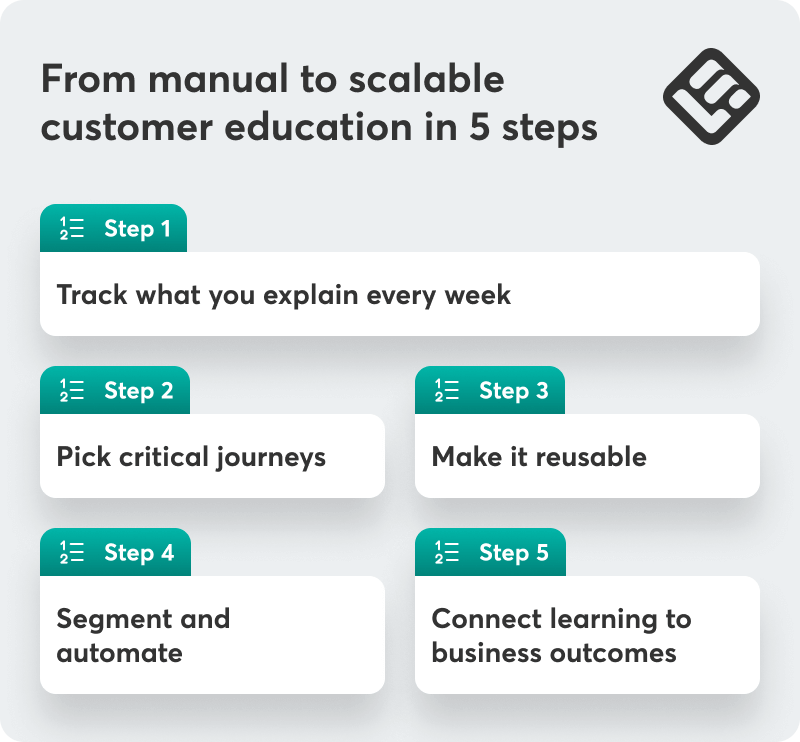
1. Start where you’re already doing manual education
For a week or two, have CSMs note the questions they answer repeatedly, the parts of the product they demo over and over, and the docs, Looms, or decks they keep sending or recreating. At least a couple of patterns will surface quickly. Those are the topics you should build content for first.
2. Build the learning no customer should skip
Working on a full curriculum is overwhelming and time consuming. Start with the learning journeys no customer should skip instead, which will also give you some space for trial-and-error before you expand.
For most teams, that’s:
- New admins: setup, security, reporting
- New users: core workflows
- Internal champions: driving adoption and value
3. Turn what you have into something reusable
You don’t need to start from scratch. Use your best deck, your clearest Loom, a well-recorded customer call, and existing support articles. Keep each module under 10 minutes for better engagement and retention. Add knowledge checks to help users self-evaluate.
💡This is where an AI-powered platform like LearnWorlds helps you move fast. You can create a course outline, repurpose existing material, and generate quizzes in a fraction of the time it would take manually.
In our webinar “How we built a smarter academy 10x faster,” we explain how we used AI to turn support articles into video scripts, which dramatically increased production speed without sacrificing quality.
4. Segment and automate
Once your minimum viable academy exists, make it smarter. Two small steps go a long way:
Segment by role and tier
Make sure admins, everyday users, and champions see different content that correspond to their unique goals and use cases.
Automate based on user behavior
Replace manual sending with simple rules. New admin added? Invite them to “Admin Essentials.” New customer signed? Start them on the “First 30 Days” path. No activity after a week? Send a gentle reminder.
💡In LearnWorlds, this typically means combining groups and tags with program enrollments and notifications, so CSMs aren’t the ones pressing send every time. For more on this, read our blog post “Start here: three repeatable customer success processes to automate for impact.”
5. Integrate learning data into your customer success rituals
Customer education is an ongoing effort that needs to integrate into your existing rituals:
- In quarterly business reviews, discuss how the customer’s team engaged with training and how that relates to adoption patterns
- In health scores, include a few key learning milestones that correlate with product usage
- In renewal prep, use training data to explain why an expansion opportunity or risk pattern makes sense
This circles back to reporting and syncing data with your CRM, which is where the connection between education and revenue becomes visible rather than theoretical.
From firefighting to predictable, scalable success
Customer success breaks when knowledge lives in someone’s head instead of in a system anyone can access. Education is how you turn what your CSMs already do into something reusable, measurable, and genuinely scalable.
That shift doesn’t require a massive academy or a big-bang overhaul. Start where the manual work is most frequent. Pick one thing you’re explaining over and over, turn it into something structured, and let the system carry some of the load.
LearnWorlds makes this practical with learning paths that mirror how customers actually progress, groups that reflect real organizational structure, and reporting that connects to the health scores you already track.
Try LearnWorlds now with a 30-day free trial.

Androniki Koumadoraki
Androniki is a Content Writer at LearnWorlds sharing Instructional Design and marketing tips. With solid experience in B2B writing and technical translation, she is passionate about learning and spreading knowledge. She is also an aspiring yogi, a book nerd, and a talented transponster.
 Back to blog
 Scroll to top