Table of Contents
Key takeaways
- Always-on customer training shortens time-to-value, reduces support volume, and gives CSMs their time back.
- For a successful always-on support layer, map training to the customer journey, build different learning paths for each segment, automate content delivery, and establish feedback loops.
- Don’t strive for perfection from day one. Start with your most urgent use case, create your first learning path, set automations to automate delivery, and launch the program. Monitor results a few weeks later.
Customer success professionals juggle onboarding and training, renewals, support escalations, and never-ending rounds of product updates. Every week, the same questions pop up, the same how-to emails get sent, and the same decks are tweaked.
Burnout among CSM teams is common because people are stretched thin, trying to meet expansion and retention goals while also serving as the main point of contact customers build rapport with.
An always-on customer training layer gives your team breathing room. It shortens time-to-value, reduces support volume, and allows your CSMs to focus on strategic work and the human moments that matter.
This guide gives you:
- A framework to shift from reactive training to scalable enablement
- Clear ways to track progress and prove ROI
- Examples you can adapt based on your team’s maturity and tools
Why CS teams need a new training model
Customer education is a core business function. Companies that do it well see substantial wins across every metric that sustains a business [1], from product adoption and engagement to renewals and advocacy.
Yet most training today is fragmented and untrackable: a Loom video here, a few support articles there. Maybe a community somewhere in the background. And countless repetitive 1:1 calls. (No wonder your team is exhausted. They’re doing the hard work without the tools to prove its impact.)
Customers don’t have it any better. They’re stuck waiting for answers or sitting through long webinars for the one slide that matters. What they need is guidance relevant to their role, delivered at the right moment and not the day after.
Always-on training solves this by layering self-serve customer training into the customer journey. LMS solutions like LearnWorlds, built specifically for B2B customer education, make this shift easier by providing a scalable platform for role-based, self-serve training paths.
This table gives you a snapshot of how manual and always-on customer training compare across key areas.
| Manual | Always-on | |
|---|---|---|
| Delivery model | 1:1 calls, live webinars | In-app tooltips, self-paced courses, on-demand resources |
| Scalability | Limited, requires adding headcount | High, little to no additional headcount |
| Consistency | Limited, depends on who delivers the training | High, standardized learning experience per user segment |
| Personalization | High in 1:1 sessions but hard to scale/repeat consistently | High, tailored for user segment and stage of the customer journey |
| Tracking & reporting | Limited visibility into engagement and impact | High, ability to connect learning metrics to customer behavior and team efficiency |
The building blocks of always-on customer training
While every customer training program looks different, the strongest always-on strategies share a few core foundations.
Use this checklist to build a system that scales with your customer base and adapts to their evolving needs:
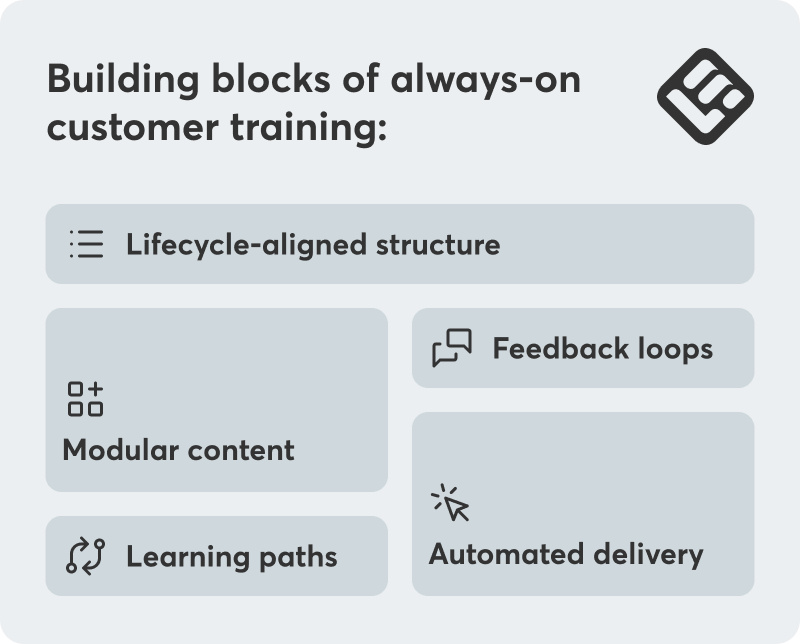
Lifecycle-aligned structure
Map training to key stages of the customer journey: onboarding, activation, adoption, expansion, and renewal. Each stage demands a different kind of enablement.
Picture a new user signing up for your project management platform. They’ll need lightweight, contextual guidance, like in-app tooltips, to complete their first setup successfully.
Product or CRM data, like feature usage, login frequency, or account milestones, help you understand where customers are in their journey and deliver the right training at the right time.
Learning paths
Personalization determines the success of any training program. Content that’s mismatched—too basic, too advanced, or off-role—can disengage users and end up waiting their time and delaying adoption.
Design distinct training tracks for different user segments:
- Admins: focus on setup, configuration, and team rollout
- End users: prioritize day-to-day workflows
- Technical users: dive deeper into integrations, APIs, and data management
Modular content
Create standalone learning modules that can be reused across training paths. Modular design helps you scale customer training, making it easier to update, localize, and personalize content without rebuilding your courses from scratch.
Examples:
- 3-5 min explainer videos
- “How to get started” checklists
- Short quizzes to reinforce learning
Automated, event-driven delivery
Timing matters. The faster your content responds to user behavior, the higher its impact. Using automation tools, like Zapier, Make, Segment, and Intercom, you can automate content delivery and trigger the right training at the right moment.
For example, if logins drop, send an automated “get more from your account” refresher with quick wins or relevant how-tos.
Connect learning moments to key behavioral events such as:
- First login
- Feature unlocked but unused
- Admin change or new stakeholder added
💡Always-on doesn’t mean CSMs step back completely. When engagement stays low, your CSM still plays a vital role by checking in personally.
Feedback loop and measurement
Build a feedback loop that connects learning to user behavior and business outcomes. Push progress data, quiz results, and course completions from your LMS back into your CRM or customer success platform and use these insights to inform QBRs and spot early churn risks.
💡A measurement system is important since day one. Proving business impact isn’t about vanity, it’s how you justify budget and earn the right to ask for more.
Can you build an always-on customer training layer in 30 days?
Yes, it’s possible to build a foundational always-on customer training program that delivers real value in under one month. It doesn’t have to be perfect, it just has to exist even as a pilot program.
What you need is a customer success LMS, and a plan.
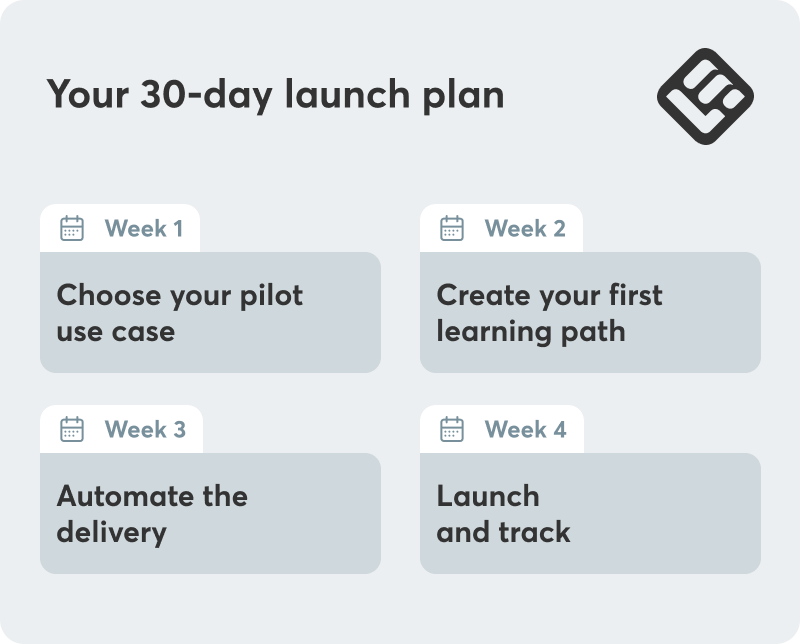
Week 1: Choose your pilot use case
How do you pick your starting point? It’s tempting to say, “Let’s just start with the use case that comes up most often and eats most of our team’s time.” For many businesses, that’s onboarding.
But if your most urgent use case isn’t obvious, the IRR framework (Impact, Repeatability, and Readiness) can help you prioritize what to tackle first:
- Impact: Does it move a metric that matters to you, like TTV, activation, expansion, or renewal?
- Repeatability: Does it happen often across multiple accounts?
- Readiness: Do you already have content or SMEs who can help you build resources quickly?
Rate each use case from 1-5 and start with the one that ranks highest overall.
Then, define two relevant outcomes, eg “Reduce TTV from 21 to 14 days” or “Cut onboarding ticket volume by 40%.” These can be your benchmarks for success.
Week 2: Create your first learning path
Chances are, you already have content you can repurpose. Looms, slides, recorded walkthroughs, and support articles can all be used in your academy.
Give shape to your first course by structuring your existing content into three-five core lessons. Add optional knowledge checks: a short multiple-choice quiz is enough to reinforce learning without overwhelming customers.
💡With LearnWorlds’ Learning Programs, you can group different courses under one program to create a complete learning path. Optionally, you can set completion rules (eg a 70% passing score or higher) to unlock lessons or courses or use content dripping to control when new lessons are available.
You can always enrich your course with fresh material. Most modern LMSs include built-in, AI-powered authoring tools that speed up creation and remove the need for extra software.
Week 3: Automate the delivery
Once your course is ready, make sure the content finds your customers, and not the other way around. “Always-on” means the right resource appears exactly when it’s needed.
Automate content delivery using behavioral triggers from your CRM, product analytics platform, and support tools:
For example:
- A new account is created on the CRM → Zapier auto enrolls them in an onboarding path
- A user hasn’t logged for 14 days → An email with tips is sent to get the user back on track
For this to work seamlessly, your systems must sync in near real time. Connect your LMS, CRM, and analytics tools through native integrations or middleware like Zapier. For advanced setups, use webhooks or APIs.
💡LearnWorlds offers an LMS and HubSpot integration, works with Zapier, and also supports webhooks and APIs for advanced customization.
The goal is to create a closed feedback loop where customer behavior triggers learning, and learning data feeds back into customer insights. Without this, you don’t have a working system but scattered content.
Week 4: Launch and track
Start with a soft launch with just 10-20 new accounts. This low-risk pilot allows you to test and refine your strategy before you scale. Allow for a few weeks for the first results to kick in, then come back to collect data. To track how training engagement ties to user behavior and internal efficiency, focus on three key areas:
- Learning engagement: Track course-completion rates, time spent on activities, and median time to completion on your LMS, and collect qualitative learner feedback from surveys.
- User behavior: Compare trained vs untrained users. Do trained users adopt advanced features faster, log in more frequently, or submit fewer tickets?
- Team efficiency: Gather input from your CSMs and support team. How much time have they reclaimed from onboarding or repetitive support tasks?
Bottom line, business outcomes like reduced time-to-value, time saved from onboarding, fewer support hours, translate into ROI. If these aren’t moving, no matter how high the completion rates, it’s time to rethink your strategy.
Should always-on customer training be a priority for you?
Ask yourself a few key questions. If you answer “yes” to three or more, you’re ready to build your always-on, scalable customer training program.
Questions to ask:
- Are your CSMs repeating onboarding or support messages weekly?
- Do you have clearly defined lifecycle stages?
- Can you identify your top three customer personas?
- Do you have two-three training assets that could be repurposed or created quickly?
- Are you using a CRM or CS platform that can sync with training tools?
- Can you track metrics like feature adoption, activation time, or renewal rate?
- Is leadership asking you to improve customer outcomes without adding headcount?
Training that works in the background
Always-on doesn’t mean generic or set-it-and-forget-it. It means shifting from a reactive firefighting model to a scalable system. For lean CS teams struggling with burnout and repetitive work, this is the smart system that scales your team’s expertise without requiring their constant, manual involvement.
When you build smart, training becomes a growth catalyst, a system that delivers better outcomes, higher adoption, and greater revenue without overwhelming your customers or burning out your CSMs.
With LearnWorlds, you get the integrations, ease of setup, and deep reporting needed to scale customer training while tying every learning moment back to the business outcomes that matter. Try LearnWorlds now with a 30-day free trial.

Androniki Koumadoraki
Androniki is a Content Writer at LearnWorlds sharing Instructional Design and marketing tips. With solid experience in B2B writing and technical translation, she is passionate about learning and spreading knowledge. She is also an aspiring yogi, a book nerd, and a talented transponster.
 Back to blog
 Scroll to top
Related Articles