

Table of Contents
If you’re running training for multiple organizations, you don’t need convincing that the content is only half the work.
There’s a lot of unglamorous admin work that needs to be done if you want to scale external training. You have to keep each client’s space separate, give the right people the right level of access, and be able to answer “How is our account doing?”, ideally without spending hours assembling and interpreting reports.
And it gets risky the moment you involve people outside your team, which you have to. A client’s program manager asks for access to enroll learners and send reminders. A regional lead wants to track progress for their own group. A partner admin needs to manage only their organization’s users.
If your roles and spaces aren’t clean, “give them access” can turn into a gamble. You might block clients from what they need, or accidentally give them visibility into something that isn’t theirs.
This guide walks through three concrete architecture patterns for multi-client training in LearnWorlds. Each pattern uses specific tools (User Groups, User Tags, and Multiple Schools) to create boundaries that are clear enough to scale safely and practical enough to manage in the real world.
The architecture you choose will determine how safely you scale from 10 to 200 organizations, how much admin work lands on your team versus local coordinators, and how easily you can answer “what’s happening in this customer’s account?”
Architecture One: User Groups
User Groups are “organization buckets” inside one LearnWorlds school. You place users into a group (one group per client company) so you can manage, enroll, communicate with, and report on that organization’s learners together.
All content lives in one place. What changes is who sees what and who can manage whom.
This works best when you deliver similar programs to many organizations and want to scale without multiplying schools.
The separation comes from three building blocks:
User Groups → represent each client account
User Tags → add structure (cohorts, regions, roles)
User Roles → control what client coordinators are allowed to do and access.
Together, these create clear boundaries inside one shared academy.
The mechanism
For each client, you create a dedicated User Group. Users are added manually, via bulk import, or automatically using rules such as email domain or custom fields.
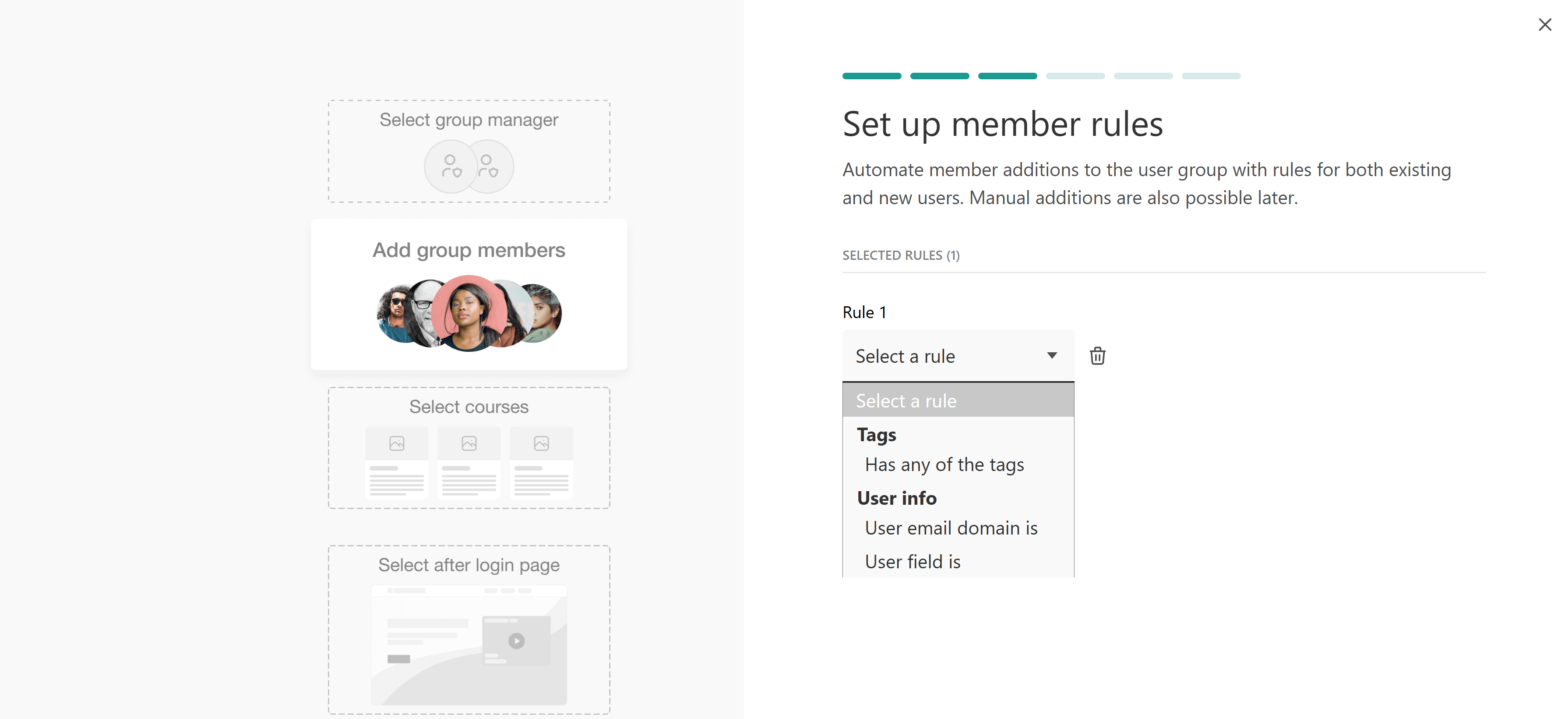
You link the group to the right products, like courses, bundles, or learning programs, and switch on automatic enrollment if needed. New users then get the right access as soon as they’re added, which makes onboarding smoother and much faster.
You then assign a User Group Manager (or a custom role). This allows the coordinator to:
- Manage users
- Enroll learners
- Track progress and performance
They cannot see or manage other clients.
| A Group Manager can: | A Group Manager cannot: | |
|---|---|---|
| Add users to the group (individually or in bulk) | Access your main admin dashboard for the whole school | |
| Enroll/unenroll those users in courses assigned to that group | Change school-wide settings (branding, domain, integrations, email sender, etc.) | |
| Monitor progress and engagement for users in that group | Change anything related to billing, payments, or pricing | |
| In many setups, also review assessments for those users | See all users and all reports across the school, or other organizations’ groups and learners | |
Reporting is handled by filtering reports by User Group. When a client asks, “How are we doing?”, you can answer using their specific group data, or they can check the reports themselves.
Security in this model depends on permissions. Clear role settings control who can see and manage what.
Why you’d choose this architecture
You want one central academy that’s easy to manage, and you also want clients to handle their own learners without needing separate portals. You’re working with multiple clients who follow a similar structure, and you want onboarding and reporting to stay straightforward as you grow.
Skip this if every client expects its own URL, or if you work in a highly regulated context where even sharing the same underlying school feels risky.
Read more about User Groups and User Roles.
Architecture Two: User Tags
User Tags are labels you attach to people in your school. It’s how you add metadata to each user so you can find and treat users differently.
Tags help you organize, automate, and report at scale by labeling users in ways that match how your external training programs actually run.
The separation comes from layered labeling:
User Group → defines who they belong to (the organization)
User Tags → define what’s true about them (cohort, region, status, tier)
This layered structure allows you to maintain client separation while gaining analytical depth.
The mechanism
You assign descriptive labels to users. A learner can have multiple tags at the same time.
For example, a learner might belong to “Client A” and also have tags such as:
- REGION_UK
- COHORT_Q2_2026
- ROLE_MANAGER

This makes it possible to generate reports like:
- All managers inside Client A
- All stalled learners across UK cohorts
- A specific cohort within a specific client
If new users enter LearnWorlds automatically through your company system, you can set rules like this:
- “If the email ends with @clientA.com → add Tag: Client A”
- “If department = Sales → add Tag: Sales”
So when the person logs in for the first time, the system adds the right Tags automatically.
Tags can also trigger automations and targeted communications by letting you set rules like “if a user has this Tag, send this email, enroll them in this course, or include them in this specific campaign.”
When it comes to permissions, you cannot delegate full admin management as with User Groups. With tags-only org separation, the delegation model is like this:
You (the admin) create a User Segment that’s filtered by the org tag, and then you assign a Reporting Role and restrict what they see to that Segment (and specific Courses, if you choose).
What they can see/do depends on the role type: they can either be a Segment Reporter or Segment Manager.
A Segment Reporter can review the progress of users in the assigned segment
A Segment Manager can review progress and manage Gradebook + Certifications for users in the assigned segment
Why you’d choose this architecture
You want a simple way to organize users without creating new schools or adding complexity. Tags are useful when you need more detailed filtering and clearer insights, but you still want to keep everything in one shared school. It’s a good solution if you don’t want to delegate full admin access to the client, but still want to give them access to reports and/or grading and certification management.
User Tags only help you organize users.They do not control access or create isolation. If a client needs their own manager who can manage only their people, skip this approach.
Read more about User Tags.
Architecture Three: Multiple Schools
Multiple Schools = separate, independent academies (portals) under one LearnWorlds organization. Each school is its own space with its own users, content, settings, and reports. You manage/switch between them from the Multiple Schools Dashboard.
This model gives each client their own independent LearnWorlds school.
Each school has its own URL, branding, users, and administrators. From the client’s perspective, it is their own platform.
The separation comes from structural isolation:
Independent URL → each client logs into their own portal
Independent user database → no shared users
Independent administration → local admins operate only within their school
Separation is built into the system itself.
The mechanism
You create one school per client. Most organizations maintain a master template school with standard content. When onboarding a new client, you clone that structure and adjust branding, navigation, and configuration as needed.

You can set up the same permissions in every school so things work the same way everywhere. Here’s what admin roles can do:
- Access that school’s admin dashboard and manage the school (courses, users, enrollments, settings, reporting), depending on the permissions of the role you give them
- They can see only their school’s users/content/reports
- They cannot see or manage other client schools, unless you also add them there
Because each school has its own database, cross-client visibility is technically impossible. From a security perspective, this model offers the strongest isolation, as it keeps clients completely separate. It’s often used when data privacy is critical, such as in regulated industries, large enterprises, public-sector organizations, or companies managing multiple brands.
Why you’d choose this architecture
Clients need their own branded portal and separate login. Contracts or regulations require their data to stay completely separate. Or the size and sensitivity of the account make full separation the safer choice.
Read more about Multiple Schools.
Which architecture fits my situation? Real-world patterns from LearnWorlds customers
Not all separation models provide the same level of isolation. The right choice depends on your risk profile, client expectations, commercial model, and growth plans.
The following questions help clarify which architecture aligns with your needs.
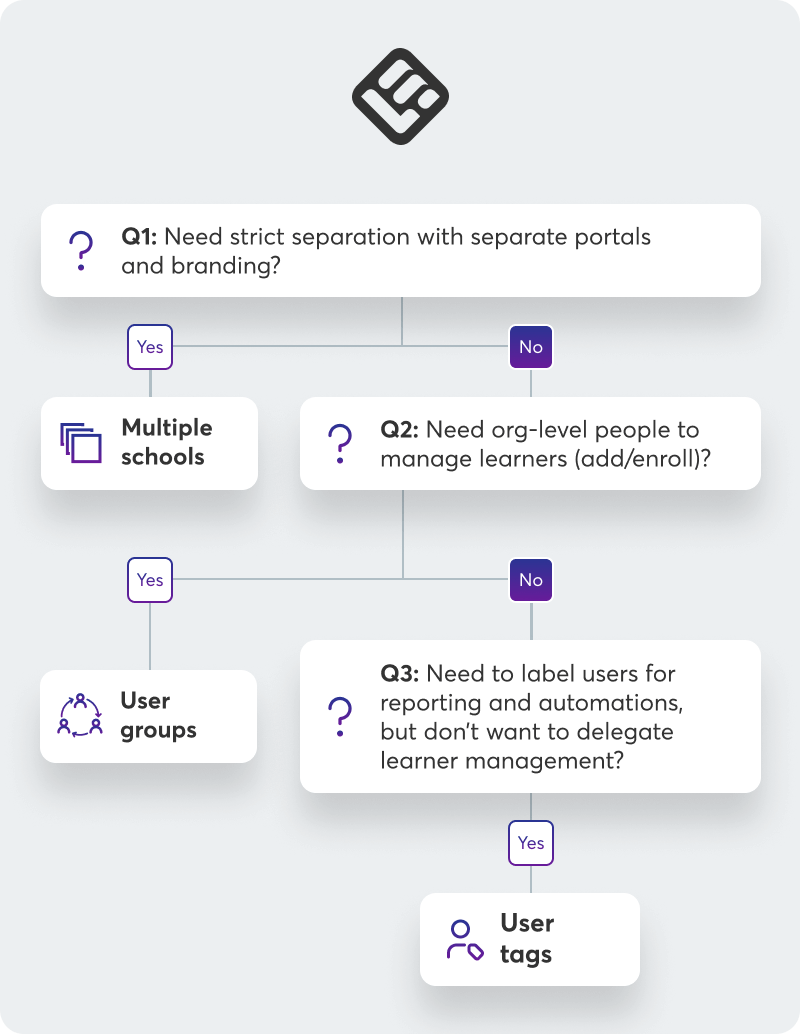
More specifically, ask yourself:
1. How serious would a cross-client mistake be?
“Mildly inconvenient” → User Groups + Tags
“Legally, contractually, or reputationally serious” → Multiple Schools
Real-world example:
An internal L&D team delivering training to different departments, including some sensitive HR-related programs. Most training can live in one school using User Groups and carefully defined roles. However, highly sensitive initiatives are separated into their own school to reduce risk.
2. Do clients expect their own portal?
“We’re fine sharing your academy” → User Groups + Tags
“We promised ‘your own platform’” → Multiple Schools
Real-world example:
A franchise network where each regional branch wants local branding and administrative autonomy. Multiple Schools allow each branch to operate independently while the central organization maintains oversight.
3. How do you sell your training?
Flat access model, same structure for everyone → User Groups
Different cohorts, segments, or layered reporting needs User Groups + Tags
Highly distinct enterprise accounts requiring separation → Multiple Schools
If commercial differences mainly affect reporting and segmentation, Tags are often sufficient. If they affect branding, governance, or contractual boundaries, Multiple Schools may be required.
4. Who should manage day-to-day administration?
“Our team manages everything centrally” → User Groups
“Client coordinators manage their own users” → User Groups
“Each client needs full administrative autonomy” → Multiple Schools
The more autonomy clients require, the stronger your separation model must be.
5. How many client organizations are you planning to support?
Dozens of similar clients → User Groups
Large organizations, multiple regions, high-sensitivity sectors → Multiple Schools
In practice, many organizations adopt a primary architecture and then introduce variations as needed. For example, they may operate one school with User Groups for most clients, while reserving Multiple Schools for enterprise or regulated accounts.
Already in a tangle? A checklist for quick transition to mutli-client training
A lot of teams don’t design their multi-client setup on day one. They grow into it by accident:
- Courses cloned again and again for each new client
- Groups and tags created on the fly with no naming convention
- Multiple schools, but nobody remembers why some of them exist
- Reporting that only one heroic admin knows how to pull
If that’s you, don’t throw everything away and start from scratch. Do this instead:
1. Stabilize
Stop adding new complexity.
- Decide which architecture(s) you want to move toward for future clients
- From today onwards, stop creating new “special cases” that don’t fit that pattern
- Document, in one page, how new clients should be set up from now on
This doesn’t fix the past, but it stops the mess from growing.
2. Pilot
Pick one client or region that matters but isn’t mission-critical.
- Re-create them using your new architecture
- Keep the scope small: a subset of courses, a limited set of users
- Test: Is reporting easier? Are roles clearer? Do admins know what they can and can’t do?
Use this pilot to refine your blueprint before you touch everyone else.
3. Normalize
Once the pilot feels solid:
- Identify existing clients where the impact of change is worth it
- Move them to the new pattern gradually, at natural breakpoints (renewals, new cohorts, new contracts)
- Freeze old patterns: no new clones, no new ad-hoc schools unless there’s a very good reason
Think of it as tidying a house one room at a time, not demolishing and rebuilding.
Bring it all together
Sketch your current setup. Mark where it feels risky, confusing, or manually heavy. Pick one pattern and test it with a single pilot client. If that pilot feels clearer and safer to report on, you’ve found your new default. Then it’s just rollout client by client, with clean boundaries from the start.
Once you decide how clients are separated and who owns what, LearnWorlds gives you the pieces to make it real: User Groups and Roles for shared schools, User Tags for layered segmentation and reporting, Multiple Schools when separating clients matters.
Try LearnWorlds now with a 30-day free trial.

Androniki Koumadoraki
Androniki is a Content Writer at LearnWorlds sharing Instructional Design and marketing tips. With solid experience in B2B writing and technical translation, she is passionate about learning and spreading knowledge. She is also an aspiring yogi, a book nerd, and a talented transponster.
 Back to blog
 Scroll to top