
Interactive video software for elearning
Turn passive watching into active learning with our video-based educational platform
Use LearnWorlds’ online video education platform to keep learners engaged, improve retention, and create impactful learning experiences in just a few clicks with AI assistance.
900k
Courses created
$1b+
Customer revenue
2m
active monthly learners
TL;DR
LearnWorlds’ Interactive Video Editor transforms passive video into engaging, trackable training with built-in, AI-powered interactivity and analytics.

Achieve higher retention with interactive elements like questions, CTA buttons, pop-ups, and social reactions
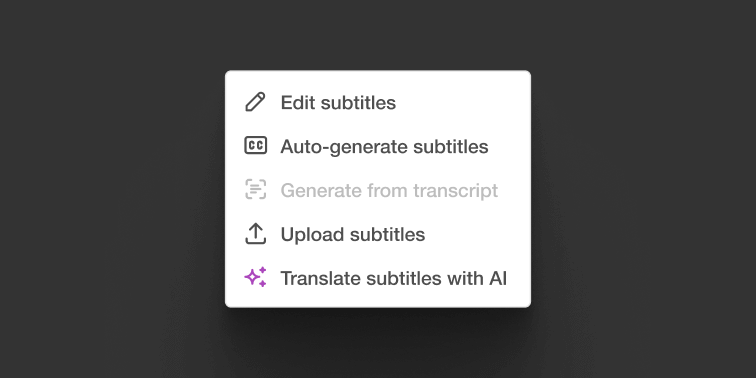
Instantly generate subtitles, translations, and summaries with AI

Get detailed analytics on plays, drop-offs, and interactions

Fully mobile-ready and secure with watermarking
Best for:
HR, L&D, and compliance teams building high-impact internal training at scale, as well as individual creators, edupreneuers, and coaches.
Make your videos interactive and capture your learners’ attention like never before
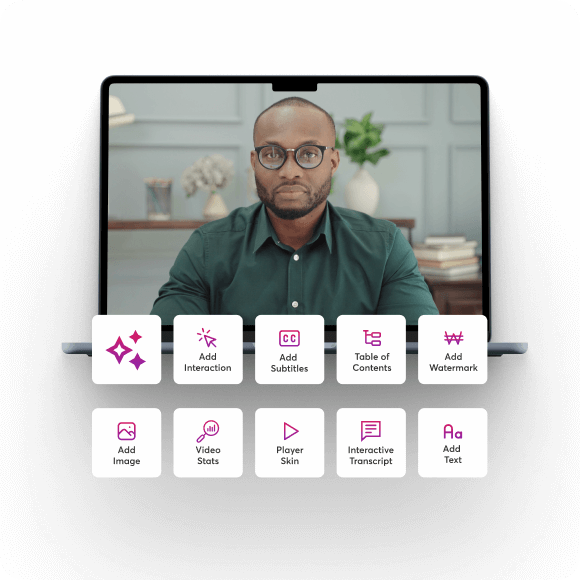
Boost your videos with interactions powered by AI. Instantly add AI-generated subtitles, quizzes, summaries, and structured navigation, all in one place, without spending extra hours in post-production.
Make learning dynamic and responsive
Make learning more dynamic with AI-generated interactive questions and engagement checkpoints. AI-generated questions and in-video feedback keep learners engaged and motivated—turning interactive training videos into active, measurable learning.
Enable learners to navigate the video as they watch
Empower learners with AI-generated tables of contents, allowing them to explore and control their learning journey. Help them find key moments instantly and engage with the content in a way that drives better outcomes.
Achieve deeper understanding and better retention
Provide real-time feedback at critical moments with AI-powered summaries and engagement checkpoints. Help struggling learners stay on track, reinforce key concepts effortlessly, and maximize understanding for lasting retention.
Let AI handle the heavy lifting in AI-powered video interactivity
You’re already creating valuable content. Make it interactive with AI suggestions you can customize to match your voice, style, and learning objectives. You’re always in control—tweak, refine, and make it truly yours.
Subtitles
Generate subtitles and transcripts
Make your content accessible to everyone, including those with hearing impairments or language barriers. Automatically create accurate subtitles and transcripts with AI assistance, with an option to edit them manually to ensure precision.
Translations
Translate subtitles and transcripts
Expand your reach with AI-powered translation. Make your videos accessible to a global audience in just a few clicks. Effortlessly cater to diverse learners and grow your impact worldwide.
Table of contents
Create tables of contents
Improve navigation and learner engagement by breaking your video into clear, structured sections. AI-generated chapter markers appear on the video progress bar, allowing viewers to jump to the most relevant parts. Customize these sections to align them perfectly with your content.
Interactive elements
Add interactive elements
Boost engagement by embedding AI-generated questions directly into your videos. Choose from multiple-choice, open-ended, or reflective prompts and place them at key moments. Edit and refine questions to match your learning objectives.
Summaries
Generate summaries
Our interactive video software automatically generates a concise, easy-to-read summary of your video content. This is perfect for giving learners an overview of what to expect or for quick revision after watching the video.
“I like that LearnWorlds provides me with a fully functional website where I can offer my students self-study resources and a community chat. The team is responsive and professional, and they really care about what they are doing.”

“I find the AI bot helpful as it gives answers to my questions and even generates pictures for problem-solving. The platform is easy to use, and I love the different ways a course can be customized and has so much interaction.”
“We get email prompts about enrollments, which is a wonderful experience, allowing us to welcome new people with ease. The hands-off experience lets me focus on chemistry, removing the technical hassle of enrolling people.”
“The platform has been easy to set up and navigate. Plus, the onboarding calls have been helpful and tech support is extremely responsive! I am so pleased So far, the tech support has been worth every penny I’ve paid!”
“The platform integrates our website, funnels, marketing, and learning system all in one place, which is super convenient. I also appreciate their regular updates and the support team, which is extremely responsive.”
“I like the sleek, modern, easy to configure aspect of the platform. It is very easy as an admin to to set up pages without using code. I also like the modern features – like lesson markers, ai, and reporting”
“It’s amazing compared to our old learning platform. Every time I think of something I’d love to be able to do, a quick search shows that it’s available, and over a year in, in still finding even more features.”
“The wide range of features, responsive support, and regular platform updates. The value is good for the price, especially considering the range of features, regular updates, and responsive customer support.”
“It’s just amazing to find an all-in-one platform that delivers such high quality, they’ve really raised the bar and I love not having to compromise on the product we deliver because of software limitations.”
“The platform is really configurable, giving us a huge amount of flexibility about how to lay out our course. It’s allowed us to deploy our course in a drip feed format, which is fantastic for our learners.”
“I am using LearnWorlds for long time and it give us interactive video features, quizzes, buttons, notes inside videos and many more. LearnWorlds provide all in one online course and its creation tools.”
“I am not an L&D professional, but have familiarity with HR and training more broadly. The platform is very intuitive and does not feel too “niche”.”
“The site is very user friendly and easy accessible. UI/UX is wonderful. The onboarding was also very easy”
“There are a lot of unique and user friendly features. The system is very customizeable.”
“The best Part is the support team. They are really quick.”
Make interactive videos with smart navigation for real-time learners’ engagement
Turn any training video into an interactive, trackable learning moment—with clickable guidance, in-video resources, and built-in navigation. Help your learners stay focused and finish faster.
Pop-ups
Brilliant pop-ups
Use pre-made pop-ups for deeper explanations, insights, or guidance—right when learners need them.
Buttons
Buttons
Enhance interaction with clickable buttons for tips, feedback, pop-ups, and seamless navigation options.
Watermarks
Watermarks
Brand your interactive training videos in seconds with logos or text overlays for a polished, professional look.
Contents
Table of contents
Add a table of contents so that users can see what’s relevant to them.
Transcripts
Transcripts
AI-extracted transcripts provide real-time, searchable text, making content easier to review and navigate.
Embeds
Smart embeds
Easily overlay additional resources, interactive elements, or external content to enrich the learning experience.
Interactions
Peer interactions
Foster engagement by inviting learners to comment, ask questions, or reflect at key moments of your video—comments are visible to everyone. Sprinkle in emoji reactions, like a heart at the end, to spark positivity and leave a lasting impression.
Deliver a smarter, safer, smoother learning experience—on any device—with LearnWorlds’ interactive video features
A consistent video experience for all devices
Deliver a smooth, fully responsive video experience across all devices and browsers—no interruptions, no limitations.
Keep your videos safe and secure
Host your videos hassle-free with educational video hosting built into our video learning platform at no extra cost. Enjoy built-in security, fast streaming, and optional watermarks for content protection.
Discover interesting reports for viewership
Gain deeper insights into learner engagement with detailed reports on plays, rewatches, drop-offs, and interactions to optimize your content with the LearnWorlds interactive video features. Use data to improve your videos, fix drop-off points, and amplify what works.
Compare the leading LMS interactive video solutions
See how LearnWorlds stands out from other educational video platforms designed for internal training, compliance, and employee development at scale.
| LMS platform | Interactive video features | AI-powered features | Best suited for |
|---|---|---|---|
| LearnWorlds interactive video | Clickable questions, branching, quizzes, overlays, lead forms, interactive transcripts, video analytics | AI course authoring, AI assistant in ebooks, automated content suggestions | All training use cases |
TalentLMS | Basic video embedding, quizzes post-video | Limited AI features (basic automation) | SMBs needing lightweight compliance training |
| Kajabi | Video chapters, basic overlays | AI-powered email copy and blog post suggestions | Solo edupreneurs and coaching businesses |
| Litmos | SCORM video support, assessments, and limited interactivity | Some automation for workflows, no deep content AI | Corporate compliance and enterprise training |
| EdApp | Microlearning video snippets, mobile-first interactivity | AI translation, content suggestion, auto-assign logic | Frontline workforce and mobile-first training |
Test LearnWorlds Interactive Video Editor—and get a world full of market-leading features
Experience the power of LearnWorlds’ full suite of features. One of the most advanced video platforms for education in the market to build, market, and analyze your school, while keeping your students on point with live, flexible, and interactive courses.
Flexible Courses
Design impactful learning journeys that motivate and inspire.
Interactive Video
Use video-based learning to boost engagement and retention.
Pop-up Builder
Use popups strategically to guide users and highlight key actions.
Affiliate Programs
Grow through referrals—set up and manage your affiliate network.
AI Assistant
Bring your knowledge to life: AI supports you with tailored insights and content suggestions.
Mobile App Builder
Create a branded mobile experience that fits your learners’ lifestyles.
Bundles & Subscriptions
Increase revenue with flexible bundling and recurring payment models.
Survey Builder
Collect feedback that helps you refine your courses and strategy.
Website Builder
Launch a polished elearning site effortlessly—no technical skills needed.
Checkout & Payment
Offer smooth, secure transactions with full control over pricing.
Assessment Builder
Create reliable, user-friendly quizzes and self-assessments with ease.
Analytics & Reports
Monitor performance across your school with built-in LMS reporting and analytics.
Marketing Tools
Promote your academy with powerful tools built for conversions.
Live Sessions
Connect in real time to strengthen learner engagement and community.
Custom User Roles
Assign permissions confidently with tailored access controls.
Integrations
Extend your school’s reach with seamless connections to your favorite tools.
SCORM
Upload and manage SCORM/HTML5 content for interactive course delivery.
White-label Website
Deliver a completely branded experience—your school, your way.
LTI
Bring external learning tools into one consistent training experience.
Course hub
License quality courses from other academies.
Get the best interactive video software from LearnWorlds. Sign up today
LearnWorlds gives you everything you need to create, manage, and scale interactive video learning. Powered by built-in AI and designed for engagement, our Interactive Video Editor helps you turn every video into a high-retention learning experience.
Want to make your training videos smarter, faster, and more effective? Let’s get started.
Support articles
You can use the Interactive Video Editor inside our video education platform to add hotspots, questions, and navigation elements to your videos.
Support article: How to use the Interactive Video Editor
Build your video library, configure your player, and add interactivity with the Interactive Video Editor. Upload, organize, and manage your video files, then tailor the viewing experience with interactions to turn videos into active learning.
Support article: How to upload and manage your videos
Using our interactive video software, you can add quizzes, buttons, pointers, and other engagement elements to turn any video into an active learning experience.
Support articles: Add interactions to your videos | Add interactive questions using AI
Easily overlay text, titles, and images to highlight concepts or add visual support inside your interactive videos.
Support article: How to add texts and images to your videos
Our platform lets you upload or generate subtitles and transcripts so your content is more accessible and inclusive.
Support article: How to add subtitles and transcripts to your videos
Enable emoji reactions and comments so that your learners can respond and engage directly with your videos.
Support article: How to enable users to react to your videos
You can use our software to automatically generate and insert interactive quiz questions into your videos using AI.
Support article: How to add interactive questions to videos using AI
Embed any YouTube video and turn it into a video lesson or structured learning activity inside your course.
Support article: How to create a YouTube learning activity
You can create a video learning activity by uploading your file, configuring your settings, and adding it to your course.
Support article: How to create a video learning activity
Glossary of terms
Interactive video: A type of video content that allows learners to engage through clickable elements like quizzes, buttons, links, and branching scenarios directly within the video. Drives engagement, knowledge retention, and self-paced exploration.
Hotspots: Clickable areas on a video that reveal additional content, links, or trigger actions. Ideal for adding tooltips, onboarding guides, or compliance disclaimers.
Overlay: Content (text, images, buttons) that appears over the video to enhance context, prompt decisions, or direct learner actions—without interrupting playback.
Branching scenarios: Non-linear paths within a video where learner choices determine what happens next. Useful for simulations, role-play training, or compliance decision trees.
Time-triggered interactions: Events (eg pop-ups, questions, feedback) that appear at precise moments in the video timeline to reinforce learning or prompt action.
Quizzes in video: Built-in knowledge checks embedded inside the video to assess understanding, measure completion, and drive compliance tracking.
Video chapters: Sections of a video that allow learners to skip to relevant content easily. Enables flexible learning and faster navigation, especially in longer training sessions.
Call-to-action (CTA): Prompts like “Next Lesson,” “Download Guide,” or “Book a Call,” integrated into the video to guide learners toward the next step or action.
Interactive transcript: A synchronized text version of the video that learners can click to jump to specific parts. Enhances accessibility and supports skimming.
Video progress tracking: LearnWorlds tracks how much of a video a learner watches and when they interact, enabling detailed reporting for compliance and engagement.
Mobile-optimized playback: Ensures all video interactions work on smartphones and tablets, crucial for frontline or remote teams.
SCORM-compatible videos: LearnWorlds supports importing SCORM packages into video-based courses, maintaining progress tracking and completion logic.
Embedded forms: Interactive surveys or feedback forms displayed during or after the video to collect insights, confirmations, or training satisfaction data.
Knowledge checks: Short assessments embedded within videos to validate understanding before learners progress—best used for compliance and role-based certifications.
Adaptive pathways: Tailors video journeys based on user role, prior answers, or learning objectives, allowing for personalized internal training.
FAQs
Interactive videos are dynamic learning experiences that allow viewers to engage directly with the content through clicks, questions, hotspots, and branching navigation. Instead of passively watching, learners interact with the material, explore resources, and receive immediate feedback, making the lesson far more immersive.
Interactive video learning platforms bring these capabilities into one place, helping instructors create richer, more engaging online training without external editing tools.
To make interactive videos, you start by uploading your video and then adding learning elements such as questions, hotspots, buttons, overlays, and transcripts. LearnWorlds provides a built-in Interactive Video Editor that lets you layer these elements directly onto your video without needing advanced editing software.
This means you can transform any existing video into a more engaging, measurable, and learner-friendly experience with just a few clicks. Creators typically create interactive videos to increase engagement, help learners stay focused, and offer guided pathways through the content.
Interactive videos significantly improve student engagement by transforming passive watching into meaningful participation. With interactive video software for education, learners click, respond, reflect, and apply what they’re learning in real time, which strengthens their understanding and memory.
Features like embedded questions, markers, and navigation keep learners mentally engaged and encourage them to process information more deeply.
Yes. LearnWorlds’ Interactive Video Editor allows you to add quizzes, hotspots, pointers, buttons, titles, images, transcripts, and more directly onto your video. Such elements make your content active and measurable, helping you assess learning, highlight important moments, or guide learners to additional resources.
Discover more about LearnWorlds’ features.
Yes. LearnWorlds’ interactive video features include AI-powered subtitle and transcript generation, making it easy to create accessible, multilingual, and searchable video content. The AI Assistant can automatically generate accurate captions in seconds, helping you save time and provide a better learner experience.
You can embed videos directly into your curriculum by uploading them as learning activities through LearnWorlds’ interactive video maker for education, which allows you to add transcripts, chapters, and interactive elements. This ensures your videos blend nicely into course modules.
Learn more about video-based learning.
Yes, every interactive video for elearning is fully optimized for mobile, allowing learners to complete interactions and navigate videos smoothly on any device. This mobile-ready experience also extends to your academy’s branded mobile app.
With interactive video software, you can track engagement metrics such as viewer progress, completion rates, quiz performance, and interaction hotspots. These insights, in the analytics and reports section, help you understand how learners use your videos and where they may need additional support.
Yes, LearnWorlds interactive video features allow you to upload or generate subtitles in multiple languages, making your videos accessible to learners across different regions. This ensures global audiences can follow your content without missing key information.
LearnWorlds’ Interactive Video Editor’s full features are available starting with the Learning Center plan and above. Both Starter and Pro plans have some interactive video features, but you can compare all of them to choose the right fit for your training needs.
Our platform offers the following three pricing plans:
- Starter – $29/month
- Pro Trainer – $99/month
- Learning Center – $299/month
View the detailed LearnWorlds pricing plans.
Published:
Last Update: