


Table of Contents
Key takeaways
- Diagnose before you build. Get clear on your delivery format and monetization model first. The two are deeply connected and shape every decision that follows.
- Structure for scale from day one. Organize clients, learner access, and programs in a repeatable way early, before small differences between clients start adding up into real operational headaches.
- Identify friction before launching. SSO, reporting needs, and enrolment volume are easy to overlook upfront but hard to fix after a client is already live.
Delivering training to corporate clients looks straightforward until you’re actually doing it. You’re managing multiple companies, each with their own learners, reporting expectations, and ideas about what the experience should look like. What starts as a clean setup quickly becomes a patchwork of workarounds, with every new client adding a little more complexity.
If you are trying to figure out how to deliver training to corporate clients in a way that feels professional and stays manageable as you grow, this guide is for you. We’ll look at how to structure an LMS for training multiple companies, what to think through before launch, and how to choose an LMS. Plus, you’ll get a free RFP template to use when you’re ready to start talking to vendors.
The 6-step LMS setup framework for B2B training providers
If you are delivering training to multiple companies, this is the framework to follow:
Step one: Choose how you will deliver training
Before you get into platform setup, get clear on how you will deliver the training. If you are also working out how to sell training to businesses, this matters more than it may seem at first.
Training format and monetization model go hand in hand: the way you structure and deliver the learning experience (eg, self-paced, cohort-based, blended) shapes how clients perceive the value of what they’re buying. And that shapes how you price it.
For example, when you offer ongoing access and regularly renew your content, a tiered subscription makes sense. When you’re selling a self-paced program with a clear start and end, a one-time, fixed fee fits better.
Most B2B training providers end up using one of these models:
| Delivery model | Choose this model when | Pros | Cons | |
|---|---|---|---|---|
| Self-paced programs | Offering standardized programs across many clients | Easy to scale, easy to reuse | Lower engagement if too loose | |
| Cohort-based programs | Selling higher-touch programs with live structure and accountability | Higher engagement, stronger structure | More admin, harder to scale | |
| Blended delivery | Combining digital learning with coaching, workshops, or live sessions | Higher value, more support | More moving parts to manage | |
| Ongoing academy access | Building recurring revenue through broader team access over time | Recurring revenue, broader use | Needs clear structure to work well | |
| Custom client setups | Serving larger clients that need a more tailored setup | Better fit, more premium feel | Harder to scale | |
There is no single best option. The right model depends on what clients are buying, how hands-on the delivery needs to be, and how much your team can realistically take on as new clients come in.
Simple test
Can you deliver this the same way for more than one client? Does this setup match how the client is buying? Will this still feel manageable when you have more clients running at once? If the answer to any of these is no, the delivery model may need tightening.
Step two: Organize clients
Once you know how you want to deliver training, the next question is: how will each client fit into your LMS?
This is one of the first real decisions in how to manage corporate training clients at scale. If the setup is not clear, learner access gets messy, reporting gets harder, and every new client takes more work than it should.
In most cases, you’re choosing between a few common ways to organize clients inside your LMS.
| Setup | What it looks like | When to choose this | |
|---|---|---|---|
| One shared academy | All clients use the same training environment | Your offer is mostly the same across clients and you do not need much separation | |
| One academy with separate client groups | Everyone uses the same academy, but learners are organized by client, program, or cohort | You need cleaner boundaries between clients but still want one main setup | |
| A separate setup for each client | Each client gets its own space, structure, or branded experience | For larger clients who need a more tailored experience or stronger separation | |
If you sell the same program to 10 companies, one well-organized setup will serve you better than 10 separate white-label academies. The best structure isn’t the most advanced one: it’s the one that’s clear, repeatable, and easy to manage as you add more clients.
Step three: Build an engaging learning environment
The academy must look and be easy to use. People should know where to start, what matters, and what to do next.
A few basics go a long way:
- Clean entry point: use a welcome page or program homepage as the default landing spot for each learner group
- Short navigation: limit the menu to pages learners actually need, such as Home, My Program, Resources, and Support
- Separated access: use groups, tags, and access controls so each client sees only what’s relevant to them
- No clutter: hide old courses, duplicate pages, unused menu items, and anything not relevant to the current program
- One support point: include a Help page, contact link, or short support block inside the academy
Before you launch
Test the learning environment with a small focus group to ensure everything looks polished and the navigation runs smoothly.
Step four: Build programs learners can actually complete
If you are working out how to deliver client training programs in a way that feels clear to both learners and clients, focus on making the experience clear from start to finish. Learners should know what to do first, what is required, what is optional, and what completion actually means.
Before you launch, define these basics for every program:
- Start point: make it obvious where learners begin and whether they can move freely or must follow a set order
- Time commitment: give learners and clients a realistic estimate of how long the program takes to complete
- Required modules: show clearly what must be completed and in what order, if sequence matters
- Optional resources: keep extras separate from the core path so they add value without adding confusion
- Progress visibility: make sure learners can see how far they’ve come; a simple progress indicator meaningfully improves completion rates.
- Next step: after each module, tell learners what to do or apply next—not just where to click, but what to take away
- Final milestone: end with something visible, such as an assessment, certificate, or clear completion point
- Completion rule: define what counts as “done” for both learners and clients, and make sure both sides know it before the program goes live
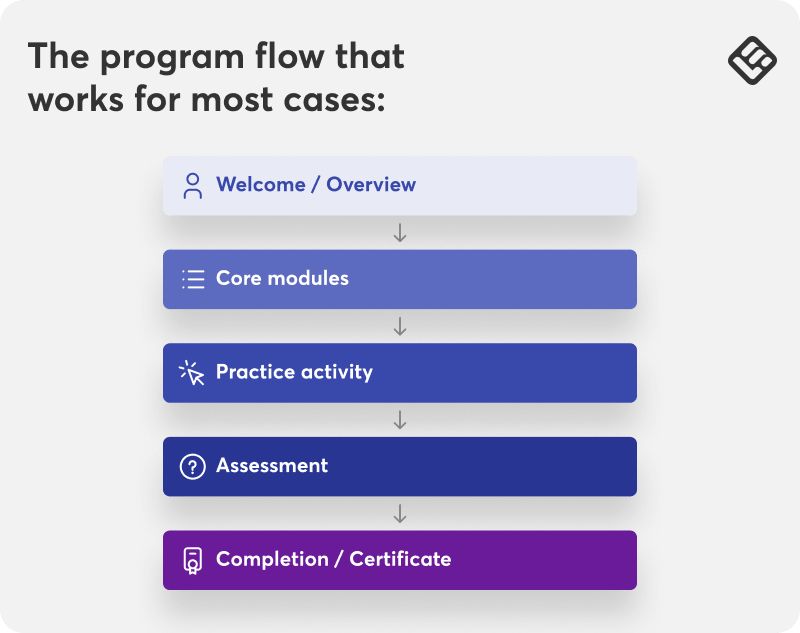
If your program is longer or higher-touch, the same logic applies:
| Program type | Suggested structure | |
|---|---|---|
| Self-paced | Clear module order, required completion, final check | |
| Cohort-based | Weekly modules, deadlines, live sessions, final milestone | |
| Blended | Self-paced lessons plus workshops, coaching, or live sessions | |
| Academy access | Recommended learning paths, not just a content library | |
Ask yourself
If a learner joined today, would they know exactly what they need to finish in under a minute? If not, the program probably needs more structure.
Step five: Check the setup details early
The problem isn’t just launching. It’s what happens after. A client wants its own reporting view. Learners struggle to get in. An integration turns out to be essential. Your team ends up doing work manually because the setup was never properly thought through.
Check these points early:
- Reporting. What does the client need to see: completion, progress, certificates, assessment results, or something else? And will they need to pull this themselves or will your team handle it?
- Client admin access. Will the client need their own admin login to manage learners, run reports, or make changes to their setup? Or will your team handle all of that?
- Learner login. How will learners access the training: direct login, SSO, or magic link? If the client uses a company identity provider, SSO may be a requirement, not a preference. Find out early because it affects both timeline and platform choice.
- User enrollment. Who adds learners, how, and at what volume? A manual process that works for 20 people won’t hold for 200.
- Integrations. Do you need to integrate with other tools or systems, like an HRIS or a CRM?
- Migration. Are you moving over users, courses, or completion records from another platform? If yes, this needs its own timeline.
- Support model: Define who handles reporting requests, login issues, and setup questions before the client goes live.
While you won’t be able to solve every edge case before launch, you do want to catch the setup details that can create friction later.
Step six: Build a setup your team can repeat
Things usually feel manageable at the start. Then a few more clients come in, small differences add up, and your team starts doing the same work over and over in slightly different ways.
That is usually the moment to standardize what should not need rethinking every time.
Start with the tasks your team repeats most often:
- Client setup: use one clear process for creating client groups, cohorts, or spaces
- Program assignment: define how learners get the right program and when
- Onboarding communication: reuse the same core emails, instructions, and next steps
- Access support: document the answers to common login and access issues
- Program structure: reuse the same page, path, or setup where possible
- Internal ownership: decide who owns setup, support, and reporting
Why this is important
The more of your delivery process you can standardize, the easier it becomes to add clients without creating extra confusion for your team.
Before you send an LMS RFP, check these first
Many training providers start comparing platforms before they have agreed internally on what they need, so they end up having confusing vendor conversations and building shortlists around features instead of actual fit.
Before you download the RFP template, make sure you can answer these questions clearly:
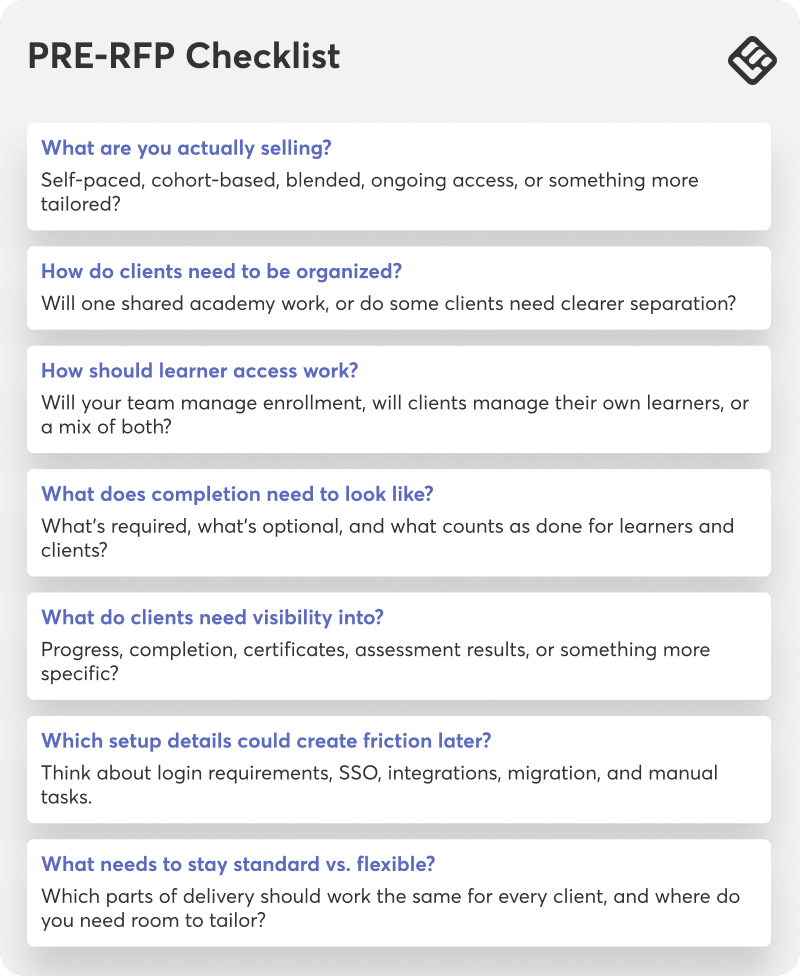
If you can answer these questions, you are ready to start comparing training platforms for training providers. Download our free RFP template now.
See it in practice
Start a free trial and explore how LearnWorlds helps training providers like you deliver training to corporate clients.
FAQs
There is no single best LMS for every training business. The right choice depends on the level of client separation needed, the complexity of reporting requirements, and whether the operation also requires branded external delivery, structured programs with certification, B2B commerce capabilities, or integrations with existing tools.
For commercial training providers selling programs to multiple companies, LearnWorlds is worth evaluating. It is built for external training delivery, supports fully branded academies, multi-client access models, structured program and certification workflows, bulk purchasing and invoicing, and connects with the wider tech stack through native integrations and open APIs.
The best way to deliver training to corporate clients is to start with a clear delivery model, then match your platform setup to it. That usually means deciding whether you are offering self-paced training, cohorts, blended programs, or broader academy access, and then making sure learner access, reporting, and admin workflows support that model.
Delivering training to corporate clients requires a platform with clean separation between client accounts, fully branded learning environments, advanced security, in-depth reporting, and structured programs with assessments and certification.
To sell training to businesses, you need a clear offer, a specific outcome, and a delivery model that feels easy for the client to understand and manage. Businesses will buy a training experience that feels structured and practical for their teams.
That is why delivery matters so much. The easier it is to explain what the client is buying, how it will be delivered, and how progress will be tracked, the easier it is to build trust and close the sale.
Most training providers get corporate clients by choosing a clear niche, packaging their training around a real business need, and showing that they can deliver it in a professional and repeatable way.
You also need to market your course with inbound marketing like testimonials and success stories, and also through ads, referrals, and affiliates. Positioning that speaks to the problems your target clients are trying to solve is critical.

Androniki Koumadoraki
Androniki is a Content Writer at LearnWorlds sharing Instructional Design and marketing tips. With solid experience in B2B writing and technical translation, she is passionate about learning and spreading knowledge. She is also an aspiring yogi, a book nerd, and a talented transponster.
 Back to blog
 Scroll to top