
LearnWorlds Microsoft Teams Integration
Schedule and run live training sessions in Microsoft Teams inside your LearnWorlds courses
Use the LearnWorlds Microsoft Teams integration to deliver live sessions where training already happens: inside your courses. Schedule once, train in Teams, and keep everything organized in your academy.

Run live training in one flow
Schedule Teams sessions inside LearnWorlds
Centralize live sessions with tracking and assignments
TL;DR
LearnWorlds makes it easy to run Microsoft Teams live training inside your academy. Your sessions are organized, repeatable, and part of the learning journey—exactly what teams want from an LMS Microsoft Teams integration:

Record and reuse live sessions as training assets inside your courses

Combine live training with structured learning paths, assignments, quizzes, and certificates

Track attendance, engagement, and progress with reporting built for internal training

Deliver a consistent, branded experience with a secure, invite-only academy—and connect alongside other tools like Zoom and Zapier
Best for: L&D, HR, onboarding, and enablement teams that already run training in Microsoft Teams and want a single place to schedule, deliver, and track learning with a Microsoft Teams learning management system approach.
For this integration, you’ll need an active Microsoft Teams business account (Microsoft 365), with admin authorization/whitelisting of the LearnWorlds Teams app.
The Teams integration is included in Pro Trainer, Learning Center, and High Volume/Corporate plans.
The classic Microsoft Teams LTI tools were sunset on September 15, 2025. LearnWorlds uses a direct integration (not LTI), so this does not affect your setup.
What syncs between LearnWorlds and Microsoft Teams
Here’s exactly what LearnWorlds and Microsoft Teams share: what gets created in Teams, what appears inside your course, and what LearnWorlds can track. This makes the LMS Teams integration concrete.
| LearnWorlds (what you do / what’s stored) | Microsoft Teams (what happens / what’s used) |
|---|---|
| Create a “Microsoft Teams meeting” learning activity in a course outline (1 supported live-session activity type: Teams meeting) | A Teams meeting is created/used for that learning activity |
| Schedule details: meeting topic, start date/time, duration | The meeting is scheduled in Teams with the same details |
| Recurring sessions: daily/weekly/monthly, up to 15 occurrences (each occurrence becomes a separate course activity) | A series is scheduled; each occurrence maps back to its LearnWorlds activity |
| Learner access inside the course player: learners see a ‘Join’ button 15 minutes before the start time | Learners join the Teams meeting from the LearnWorlds activity |
| Attendance/time tracking in LearnWorlds starts when a learner clicks ‘Join session’ (time counts while they remain on that activity page) | Teams hosts the session; LearnWorlds tracks participation based on join + time on the activity page |
| Mobile join note: if learners join via the Teams mobile app, LearnWorlds can’t track attendance/time (you can manually mark completion) | The meeting runs in the Teams app; tracking is outside LearnWorlds in this case |
| Recording/replay: after the session, you can add a Replay Video link to the activity | Recording remains in Teams (or wherever you choose to store it); LearnWorlds displays it via the replay link you add |
| Notifications: optional reminder emails + (if the Teams app is installed) pop-up notifications for admins/users | Teams notifies via its own app experience; LearnWorlds also sends configured reminders |
How to set up the Microsoft Teams integration: 4 steps
Step 1
Go to Settings → Integrations → Live Sessions in your LearnWorlds admin. Click Connect account and select Microsoft Teams.
Step 2
Sign in and authorize using your Microsoft 365 credentials (your Microsoft 365/Teams admin may need to approve the LearnWorlds Teams app).
Step 3
Open a course → Course Outline, then add a “Microsoft Teams meeting” as a learning activity and set the date/time (and recurrence if needed).
Step 4
Publish and test by joining the session using a learner test account to confirm access, reminders, and tracking.
What you can do with LearnWorlds and Microsoft Teams
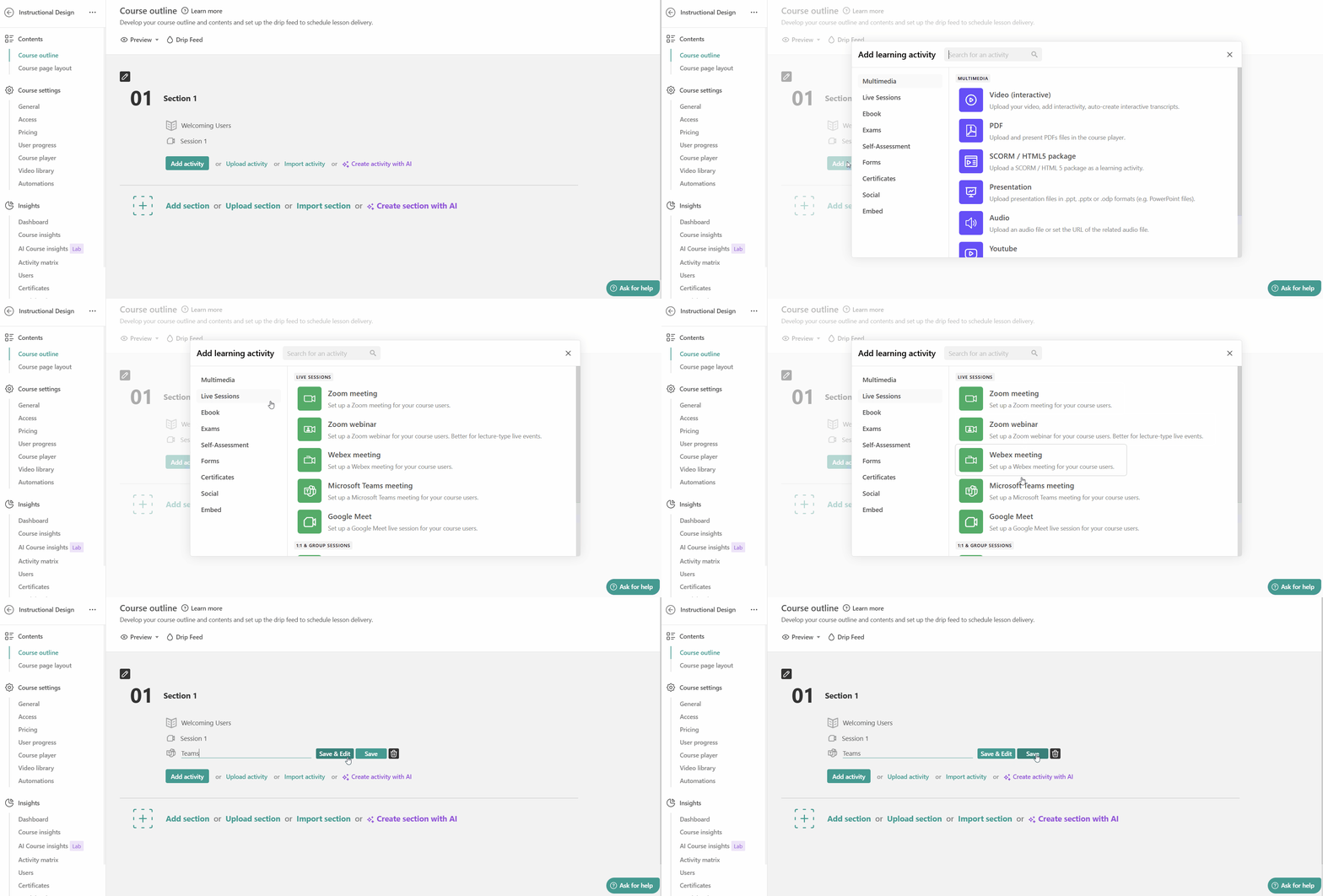
Build live sessions straight into your course flow
Add a Microsoft Teams meeting right inside your course outline. Live training sits next to videos, quizzes, assignments, and certificates, not in a separate calendar.
Run recurring training without rebuilding anything
Set sessions to repeat daily, weekly, or monthly with up to 15 occurrences. Each one appears as its own item in the course timeline, so learners know what’s next.
Let learners join in one click without leaving LearnWorlds
Learners see a ‘Join’ button 15 minutes before the session starts, directly inside the course. This keeps the learning experience consistent (course → live session → back to learning).
Turn every live session into on-demand training
After the session, add a Replay Video link to the same activity, so your learners can rewatch from the course whenever they need a refresher (recording storage/retention stays in Teams, based on your org’s settings).
Track participation alongside the rest of your learning analytics
When learners join from the LearnWorlds activity page, LearnWorlds tracks attendance/time based on join and time on page. When joining via the Teams mobile app isn’t tracked, but you can manually mark completion if needed.
Scale live training as far as your plan supports
Run as many Teams live sessions as your LearnWorlds plan supports. Microsoft Teams integration is available on Pro Trainer, Learning Center, and High Volume/Corporate plans.
Who uses the Microsoft Teams integration and how?

Corporate L&D teams running compliance training
A compliance or HR/L&D team runs recurring Teams sessions as part of mandatory training to allow employees to complete the live component inside the same course journey where they take quizzes and earn proof of completion.
- Schedule a weekly Teams live session as a course activity
- Track participation alongside course progress, then issue a completion certificate when the course requirements are met
- Standardize training across roles/locations in one branded academy (common internal-training pattern we see in practice)

Individual course creators offering cohort-based courses
A cohort instructor runs live Q&A or office hours in Teams, scheduled directly inside the cohort-based course. Then turns each session into an on-demand resource for learners who miss it or want a refresher.
- Add Teams Q&A sessions to the course timeline to let learners know exactly when to show up
- Insert the Replay Video link after each session to offer recordings live with the rest of the course content
- Keep cohorts moving with a clear structure: modules → live touchpoint → next module

Organizations delivering employee onboarding training
A people ops team builds a structured onboarding course, with the “first-week welcome call” hosted in Teams and embedded as a live activity. New hires don’t need separate links, and managers can easily verify completion.
- New hires join the Teams onboarding call from inside the onboarding course activity
- Managers/admins check completion in reporting alongside the rest of the onboarding tasks (policies, quizzes, handbooks)
- Convert live sessions into reusable onboarding content via the replay link
How Wagamama saved time and money with online employee training
With LearnWorlds, Wagamama moved essential employee training online. By standardizing onboarding across roles and locations, the company keeps costs low and makes training easier to plan and manage.

“My aim for all online courses is to include the entire 360 knowledge needed to be an effective Wagamama employee, be it a waiter, cook, delivery driver, or manager.”

Marzena Moczydlowska,
Operations Executive & former Training Manager, Wagamama Cyprus
89.6% conversions
50 courses migrated
350 users trained
LearnWorlds vs competitors—Microsoft Teams Integration
Most LMS platforms connect Microsoft Teams via LTI tools, often requiring extra configuration and IT ownership. LearnWorlds uses a direct Teams integration, allowing you to schedule Teams meetings as course activities, keep sessions inside the course flow, and reduce implementation complexity for internal training teams.
| Feature / decision criteria | LearnWorlds | Docebo | Canvas | TalentLMS | Moodle |
|---|---|---|---|---|---|
| Teams connection type (native/direct vs LTI) | Direct integration (not LTI) | Native/API-based (Entra app registration + Graph permissions) | Microsoft 365 LTI / Meetings app (LTI) | Native integration (Teams Meetings only) | Plugin-based / Microsoft 365 plugins + Teams integration (admin + Entra + Azure) |
| Teams meeting as a course learning activity | Yes (Teams meeting learning activity inside course) | Yes (Teams access from ILT courses; ILT event uses “VILT for Teams meeting”) | Yes (schedule/join Teams meetings inside the LMS course via Meetings app) | Yes (used for Conferences + ILT units) | Yes (Teams meeting activity plugins can schedule meetings in Moodle courses) |
| Attendance tracked in the LMS | Yes (tracked when learners join via LearnWorlds activity; method documented) | Not specified in public docs (docs focus on setup + meeting creation/organizer roles) | Not specified in Microsoft LTI docs (Teams provides its own attendance/engagement report) | Yes (stated) “track attendance automatically” | Not specified in these plugin docs (depends on plugin/config) |
| Session recording accessible in the course | Yes (via replay link added to the activity) | Not specified in public docs | Yes (Meetings app can find/play recordings) | Not specified in public docs | Not specified in these plugin docs |
| Microsoft 365 / Azure AD SSO | Yes (plan-dependent) | Yes (typically available) | Yes (institution deployment) | Yes (plan-dependent) | Yes, via OpenID Connect + Microsoft 365 Integration plugins |
| White-label / branded school + Teams | Yes (white-label school + live sessions) | Not specified in Teams integration docs | Not applicable (Canvas is an institutional LMS) | Limited branding (varies by plan) | Theme/customization varies; not Teams-specific |
| Course completion triggered by session | Not specified in Teams docs (depends on course completion rules) | Not specified in Teams docs | Not specified | Not specified | Not specified |
| Setup complexity / IT ownership (what docs imply) | Admin connects account; Microsoft Teams admin must authorize/whitelist app | Higher IT involvement: Entra app registration, client secret, Graph permissions, token refresh considerations | IT/LMS admin deployment: Microsoft 365 LTI + Meetings app enablement | Admin enables + instructors connect; domain admin may need to authorize | IT-heavy: Moodle admin + Entra admin + Azure subscription + plugin setup |
| Plan availability | Pro Trainer, Learning Center, High Volume & Corporate | Not specified on public page (product-dependent) | Typically available via Microsoft 365 LTI (institution-enabled) | Not specified on public page | Open source, but requires plugin/config |
Have complex Microsoft 365 or SSO requirements? Book a technical demo.
How teams run live training with LearnWorlds and Microsoft Teams

Workable Academy: From weekly webinars to structured learning
Workable’s enablement team previously ran weekly webinars, then moved to an academy model to make training more accessible and scalable. With Microsoft Teams, those live sessions can be scheduled as course activities (and later reused as replays inside the same course path).
- What they do: Replace recurring live webinars with a structured academy experience
- What they’ve achieved (via LW Teams integration): Run live sessions inside the course timeline and keep replays in-course

Pennylane Academy: Offering blended learning at scale
Pennylane explicitly runs a blended strategy to train customers and partners at scale. This is an ideal match for Teams-first orgs that want live guidance embedded in structured learning paths.
- What they do: Blend on-demand learning paths with human-led live guidance
- What they’ve achieved (via LW Teams integration): Schedule live guidance sessions as course activities and keep training centralized
“I love their customer support, which is top tier. I always receive quick replies, and they always solve my issues. When I first joined LearnWorlds, the platform was very simple to understand and get by. We’ve been going strong and love it!”

“I like that LearnWorlds provides me with a fully functional website where I can offer my students self-study resources and a community chat. The team is responsive and professional, and they really care about what they are doing.”
“I find the AI bot helpful as it gives answers to my questions and even generates pictures for problem-solving. The platform is easy to use, and I love the different ways a course can be customized and has so much interaction.”
“We get email prompts about enrollments, which is a wonderful experience, allowing us to welcome new people with ease. The hands-off experience lets me focus on chemistry, removing the technical hassle of enrolling people.”
“The platform has been easy to set up and navigate. Plus, the onboarding calls have been helpful and tech support is extremely responsive! I am so pleased So far, the tech support has been worth every penny I’ve paid!”
“The platform integrates our website, funnels, marketing, and learning system all in one place, which is super convenient. I also appreciate their regular updates and the support team, which is extremely responsive.”
“I like the sleek, modern, easy to configure aspect of the platform. It is very easy as an admin to to set up pages without using code. I also like the modern features – like lesson markers, ai, and reporting”
“It’s amazing compared to our old learning platform. Every time I think of something I’d love to be able to do, a quick search shows that it’s available, and over a year in, in still finding even more features.”
“The wide range of features, responsive support, and regular platform updates. The value is good for the price, especially considering the range of features, regular updates, and responsive customer support.”
“It’s just amazing to find an all-in-one platform that delivers such high quality, they’ve really raised the bar and I love not having to compromise on the product we deliver because of software limitations.”
“The platform is really configurable, giving us a huge amount of flexibility about how to lay out our course. It’s allowed us to deploy our course in a drip feed format, which is fantastic for our learners.”
“I am using LearnWorlds for long time and it give us interactive video features, quizzes, buttons, notes inside videos and many more. LearnWorlds provide all in one online course and its creation tools.”
“What I like most about LearnWorlds is how easy and intuitive it is to use. I also really like the possibility to customize the school and make it fit your own style and brand.”
“The site is very user friendly and easy accessible. UI/UX is wonderful. The onboarding was also very easy”
“There are a lot of unique and user friendly features. The system is very customizeable.”
Support articles
Schedule and run Microsoft Teams live sessions inside LearnWorlds courses. Learners can join from the course timeline, and you get to keep training structured in one place.
Support article: How to integrate Microsoft Teams with your LearnWorlds school
Create a Microsoft Teams meeting learning activity in your course outline to place live sessions directly in the learning path.
Support article: How to create a Microsoft Teams activity
Keep learners in one flow: the Join button appears inside the course activity (available shortly before the session starts), so learners don’t need separate links or tool-hopping.
Support article: How to create a Microsoft Teams learning activity
Turn live training into reusable content by adding a Replay Video link to the same learning activity, so learners can rewatch from inside the course.
Support article: How to create a Microsoft Teams learning activity
Track participation alongside course progress. Monitor attendance/time based on how learners join the session from the LearnWorlds activity.
Support article: How to create a Microsoft Teams learning activity
Explore the full Live Sessions help center to set up, run, and manage live training across providers and course formats. Learn more about Webex and Zoom integration.
Support article: Live Sessions
FAQs
An LMS (learning management system) is the system where you build and deliver training courses, quizzes, certificates, and reporting.
An LMS Microsoft Teams integration connects that learning hub with Teams so that live sessions can be run in Teams while staying part of the structured course experience in the LMS.
Several platforms offer a Microsoft Teams LMS integration, but they vary in how native the workflow feels. LearnWorlds integrates directly with Microsoft Teams for live training, so Teams sessions can be added as course activities and not just sync via automation.
Not really. Microsoft Teams is a collaboration and meeting tool, not a full LMS. It can host calls and communication, but it doesn’t replace course structure, assessments, certificates, and training analytics.
Teams works best as the live session layer paired with an LMS when you need a full Microsoft Teams learning management system experience. That’s why many corporate and enterprise buyers pair Teams and Microsoft Teams LMS integration with an enterprise LMS like LearnWorlds, or use it to deliver employee training or customer training.
To set up the Microsoft Teams LMS integration in LearnWorlds, you’ll need to:
1) Connect Teams from your LearnWorlds integrations area
2) Authorize with Microsoft 365 credentials (admin approval may be required)
3) Add a Teams live session as a course activity
4) Publish and test with a learner account
This depends on your LearnWorlds plan tier. Pricing plans that include the Microsoft Teams LMS integration are Pro Trainer, Learning Center, and High Volume/Corporate plans.
Microsoft doesn’t offer a standalone “Microsoft LMS” offering course delivery, certificates, reporting, or learning paths. Instead, Teams and Microsoft 365 are commonly used as the communication layer, while an LMS provides the structured learning layer for the Microsoft Teams LMS integration.
No – Microsoft confirmed that the classic Teams LTI tools were sunset on September 15, 2025, which means the older LTI route is no longer the path to rely on for new implementations. Prefer to use the Microsoft Teams LMS integration approach that doesn’t depend on those deprecated LTI tools.
Yes. Because the session is embedded as a learning activity rather than a standalone link, you can track participation as part of your course progress. This is one of the biggest benefits teams look for in a Microsoft Teams LMS integration.
For corporate training teams, this matters most when you’re running onboarding or compliance training programs and need a clear view of completion status.
Published:
Last Update: