


Key takeaways
- The AI workflow for B2B training has four parts. Turn your program materials into a complete, editable course, personalize it per client, launch client-ready assets from it, and update the master when something changes. All inside one platform instead of across separate tools.
- Every new client used to mean a new copy of the course. The corporate training market is projected to reach $809 billion by 2033, and the providers positioned to capture that growth are the ones whose delivery model doesn’t require adding new headcount for every client.
- When the core program changes, you update it once. Client variants inherit the change instead of a separate manual edit for each one, and none of the four steps require leaving the platform for a different tool.
According to SkyQuest’s corporate training market research, the global corporate training market is on track to nearly double by 2033, from roughly $445 billion in 2025 to about $809 billion.
Capturing that growth depends on delivery. B2B training providers who can adapt one program to many clients without rebuilding it each time can take on more of that demand than their team size would otherwise allow.
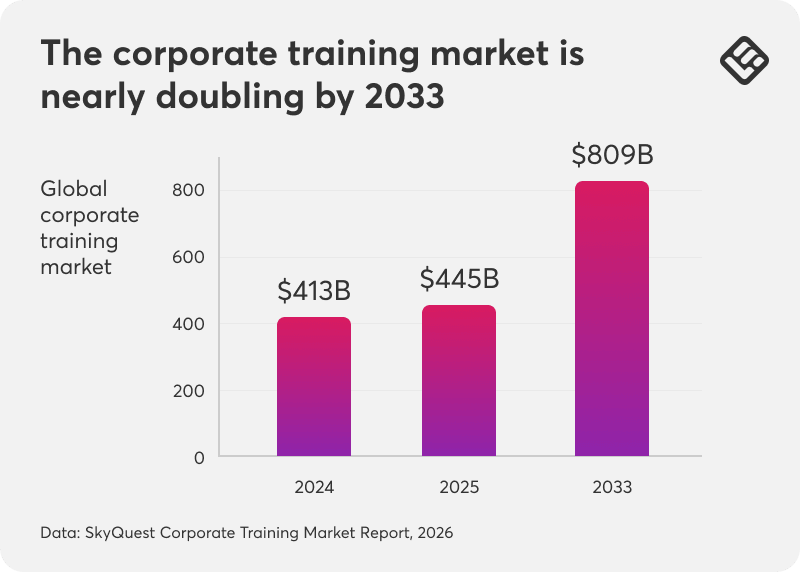
For a training provider, that growth is only good news if delivery scales with it. Most don’t, because the standard way to serve a new client is to copy the course, rename it, and start hand-editing examples, pages, and visuals across a handful of disconnected tools.
Do that ten times, and you’re maintaining ten courses instead of one.
This is what a connected AI workflow inside LearnWorlds looks like when the job is scaling your business and delivering personalized courses faster. It turns one proven program into a complete, editable course, then adapts and deploys client-ready versions instantly, without rebuilding from scratch.
If you want to explore any video content in depth or tailor AI to a unique workflow, talk to our experts.
Why disconnected tools make this harder than it needs to be
Most of the manual work in serving a new client depends on moving content between tools that don’t share context.
A typical rollout touches a document for the source material and a separate AI tool for a first draft with no knowledge of the academy. Then comes a copy-paste step to get that draft into the course or page builder, followed by manual restyling to make it match.
Each handoff is a place where work gets duplicated, or something falls out of sync.
| Disconnected wy | Connected AI workflow | |
|---|---|---|
Where the knowledge starts | Scattered across decks, docs, and methodology guides | Uploaded directly as context for the course |
Where the first draft gets made | A separate AI tool with no knowledge of the academy | Generated inside the course, already structured |
Getting it into the platform | Copy-pasted into builders by hand | Already publish-ready, no transfer step |
Fixing anything afterward | Restyle, restructure, and manually correct | Refine any part without rebuilding the rest |
The four sections below walk through what replaces each disconnected step. They turn your existing materials into a complete course, personalizing it per client, launching the assets around it, and updating it without touching every version by hand.
1. Turn your program materials into a complete, editable course
Most training providers aren’t starting from nothing. Years of expertise already exist in training decks, methodology guides, assessment frameworks, or workshop notes, just not in a shape a new client can enroll in.
With LearnWorlds AI, you paste in that existing material with Existing Content, and the AI Assistant structures it into a course outline you can check in Live Preview before anything generates in full.
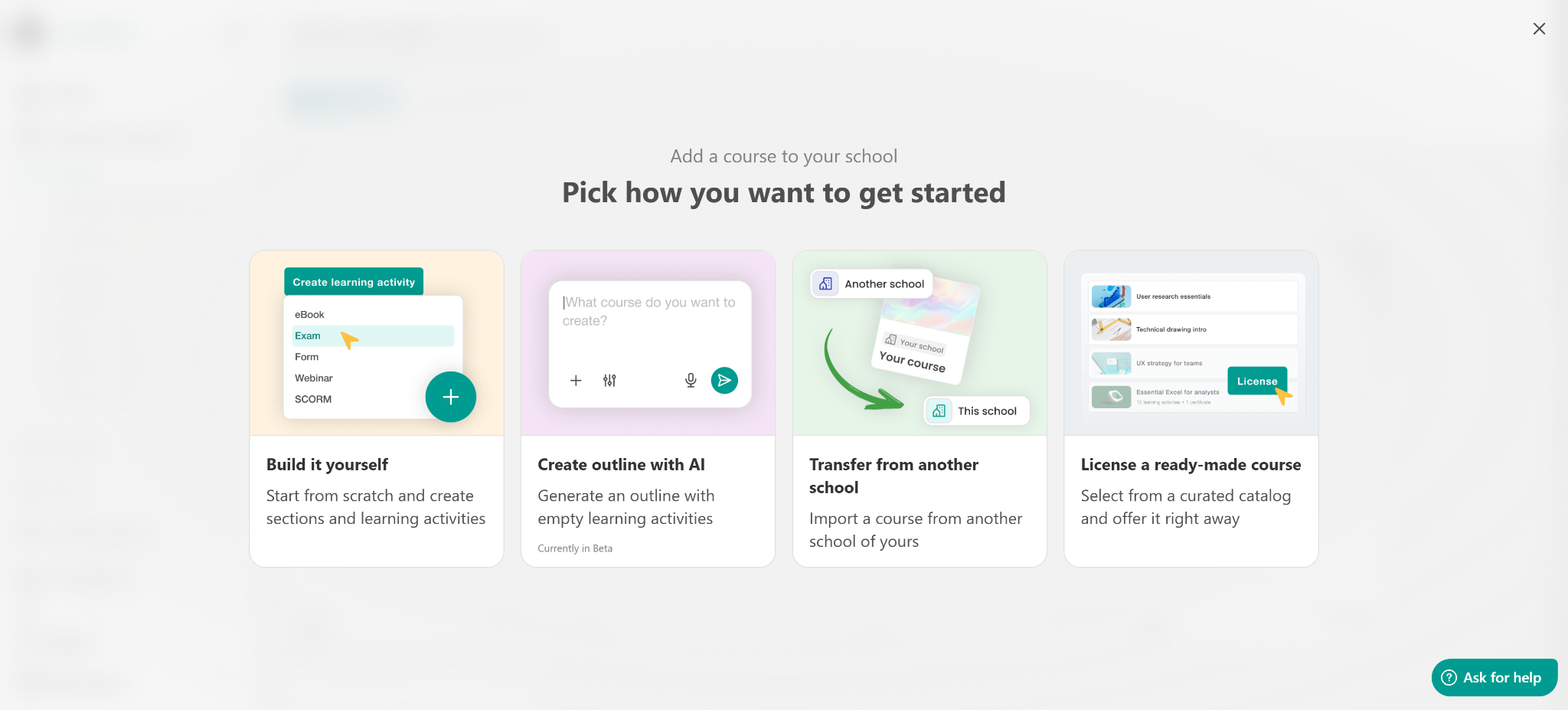
From there, it produces the ebooks, assessments, and supporting pages around it.
The result is a complete, editable course inside the platform.
Then course cloning lets that program become the reusable core for every client that follows, and you can choose whether a given clone stays in sync with the original or runs independently once it’s diverged enough to need it.
💡Check out this guide to creating an online course with AI.
2. Personalize each client’s version without duplicating the core
These are the two questions that separate training providers who scale from providers who don’t:
a) Which parts of the program change per client?
b) How much manual work does each change cost?
In practice, what changes per client almost always fall into the same three buckets:
- Client-facing pages and localized examples: the landing page, the terminology, and the scenarios a specific client will recognize as their own.
- Sector-specific materials and tailored visuals: case studies, compliance framing, and imagery that fit the client’s industry rather than a generic one.
- Launch assets and promotional materials: the enrollment funnel, welcome emails, and announcement copy that make the rollout feel built for them.
All three stay tied to one master core program, so adapting them per client never means forking the course itself.
Because Context Creation keeps the AI aligned with your existing course content, you can generate client-specific examples, scenarios, and visuals through AI Images without touching the underlying program structure.
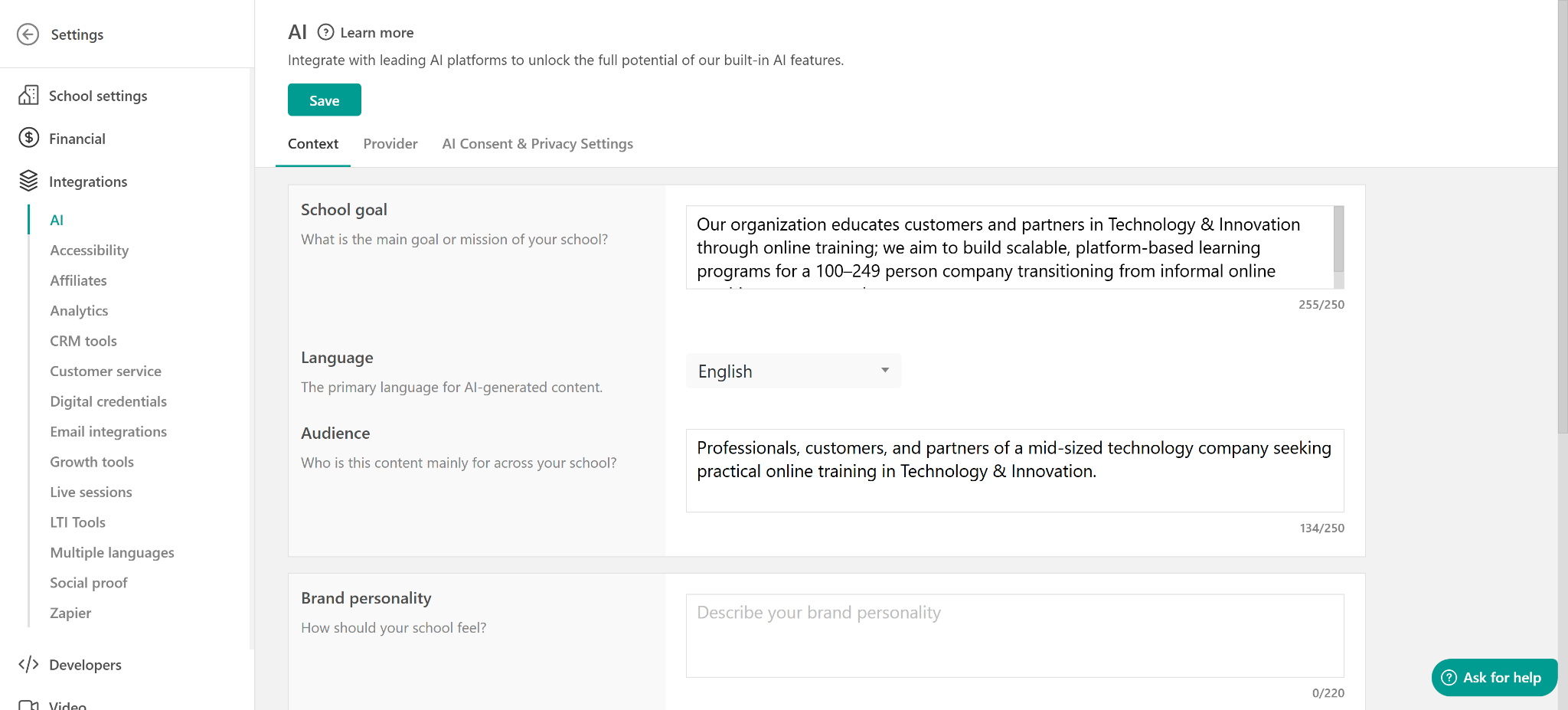
With Custom AI Instructions, you can also add custom instructions into play. These are specific rules the AI should always follow when generating content.
For example, you can instruct the AI to replace any mention of “company” with your company name eg “LearnWorlds (LW)”.
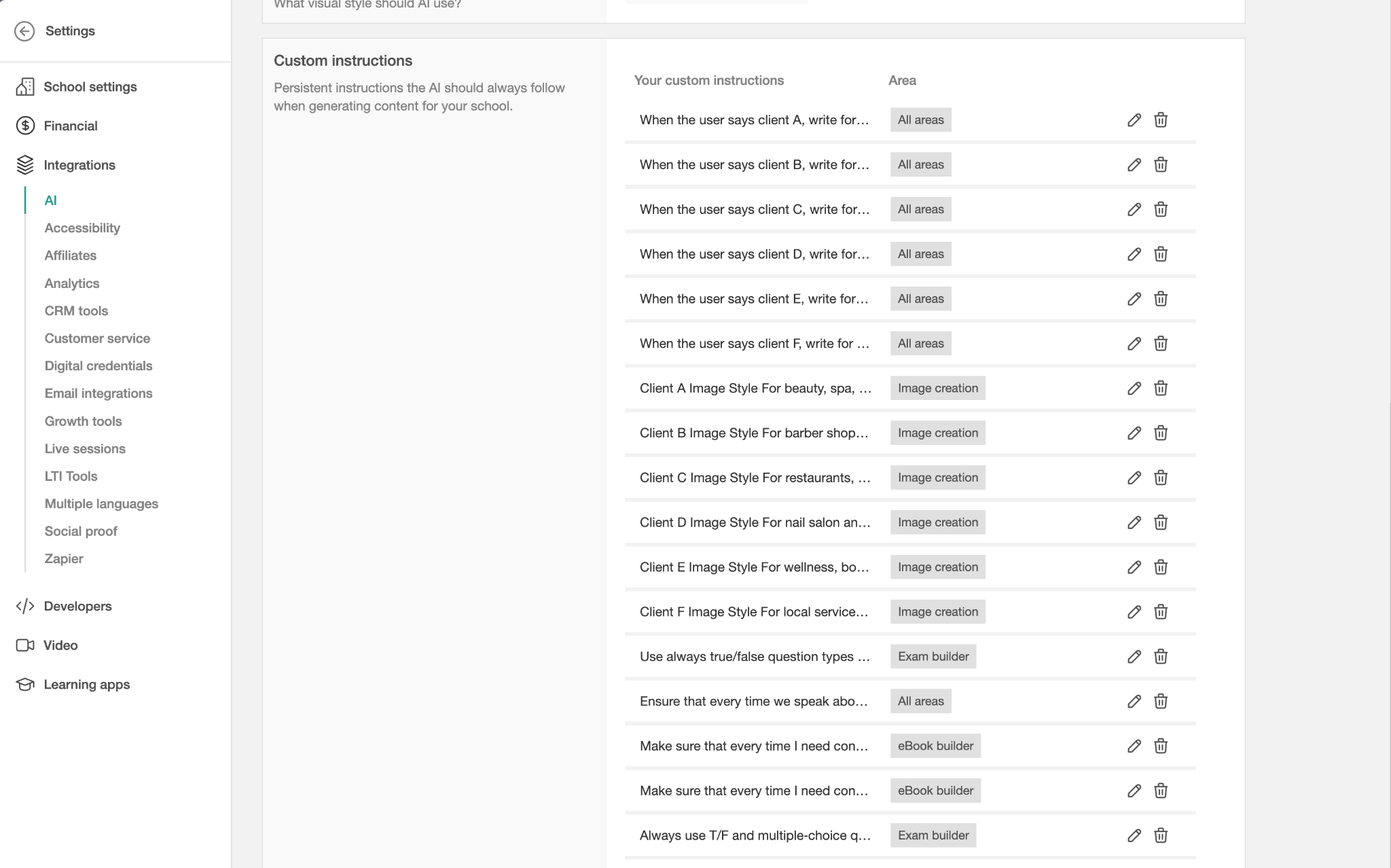
This way, sector-specific case studies, localized terminology, and different industry compliance framing all get generated from the same source rather than rewritten by hand.
That’s the throughput difference between manually editing each client version and generating it from a shared core. The same logic applies to the platform’s assessment builder. A client-specific quiz can pull from the same question bank and still reflect that client’s terminology and scenarios.
For most B2B training providers, cloning an entire course per client isn’t actually necessary.
LearnWorlds’ support guide to creating and managing B2B learning experiences covers how user groups, tags, and after-login pages let you personalize what several client organizations see from a single school, reserving a separate clone for the cases where a client genuinely needs independent branding or content.
3. Launch client-ready assets from the same course context
A client-facing rollout needs more than the course itself. It needs:
- The announcement page
- The enrollment funnel
- The promotional materials that make the delivery feel built for that client
AI Pages generates these directly from your course content, so a new client’s landing page, welcome emails, and supporting visuals come from the same source rather than a separate design or copywriting request each time.
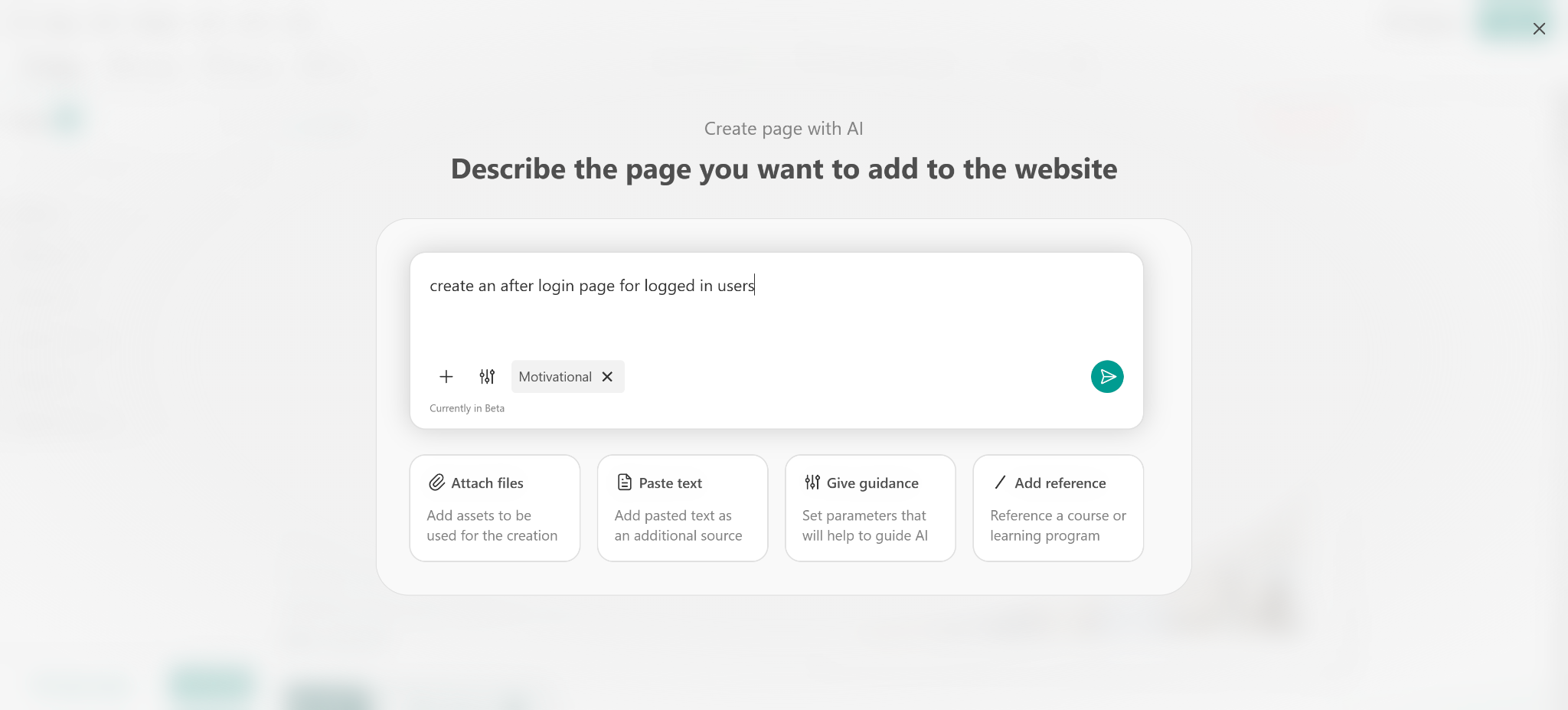
None of this requires briefing a separate designer or copywriter for every client rollout, or moving files between a course tool and a page tool. The launch assets come out of the course that already exists.
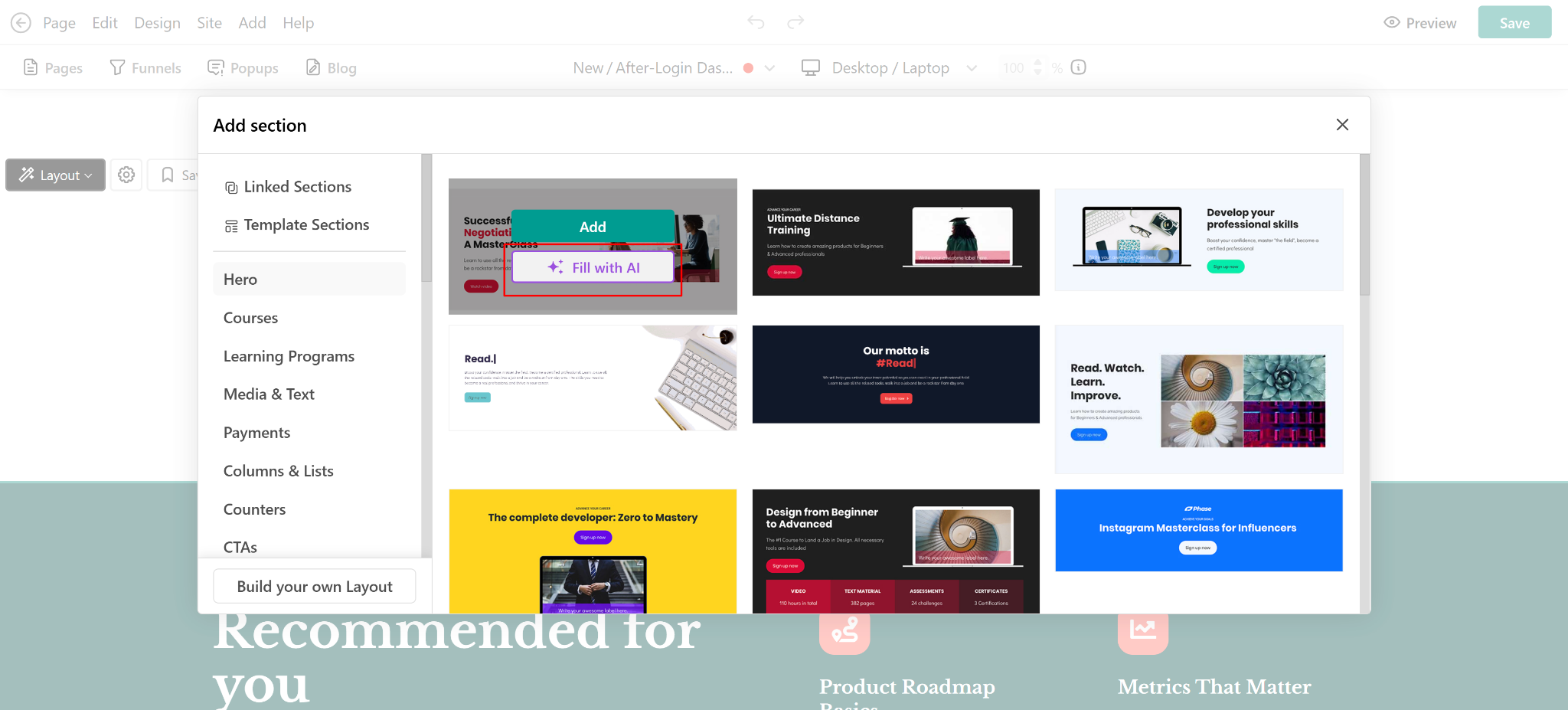
Brand consistency and quality control get harder to maintain as the client list grows. Teams can start from any template they like, but once they click ‘Fill with AI’, the design is automatically adapted to the existing website’s brand guidelines and visual style, while the content follows the instructions in the prompt.
That means every client rollout can start from the same source material and shared standards, so ten client sites still feel like one coherent program, not ten disconnected versions with the same name.
4. Update the master once, not every client copy
The initial rollout is the easy part. What defines whether this scales is how you handle the update. A program that’s right today and never revisited is a liability by the time the tenth client signs, since something in the source material will have changed by then.
Section Editing works the same way as editing any other part of the platform. Select what needs to change, describe the update, and the rest of the course, including every client-specific variant that stays synced to it, inherits the fix without a separate manual pass.
The master core program stays the single point of change, so adapting per client never means maintaining several sources of truth.
| Old way | New way with AI | |
|---|---|---|
A new client signs | Clone the course, then hand-edit examples and branding | Generate a client-specific variant from the same core program |
The core program improves | Manually re-apply the fix across every client copy | Update the master once, and synced client variants inherit the change |
A client needs a launch page | Brief a designer or copywriter for a one-off page | Generate the page from the course context, already on-brand |
If a client variant was deliberately split off as independent rather than kept in sync, that’s a one-time decision made at clone time, rather than a limitation of the update workflow itself.
What the workflow looks like end to end
Put together, the four sections above form one repeatable sequence rather than four separate tools or a fresh project each time.
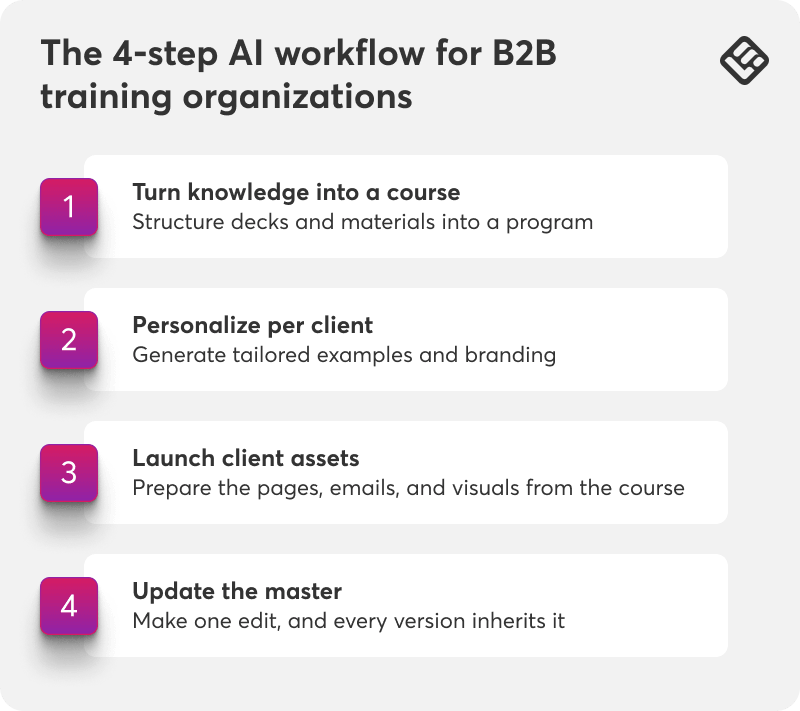
Step 1: Turn knowledge into a course
Structure your existing decks, methodology guides, and materials into a complete, editable course.
Step 2: Personalize per client
Generate tailored examples, sector framing, and branding for each client from that same core program.
Step 3: Launch client assets
With nothing more than your course already live, you can produce pages, emails, and visuals that make the rollout feel built for that client.
Step 4: Update the master
When the core program improves, update it once. Synced client variants will change automatically.
None of the four steps require leaving the course editor for a separate design tool, a separate AI chatbot, or a separate email platform.
Knowing that each asset is aware of the next one and can be used to create what you need next. That’s the actual difference between a connected workflow and a faster version of the same disconnected one.
Why this matters more as the market grows
A growing training market is only an opportunity if delivery capacity grows with it, rather than requiring a proportional headcount increase for every new client.
A training provider still cloning and hand-editing a full course per client is capping how many clients they can take on before quality slips or the team has to grow headcount alongside the client list.
💡For the full set of AI-powered content tools referenced throughout this post, explore the Help Center’s resources for creating AI-powered content.
Turn your next client rollout into a variant, not a rebuild
If your team is still cloning the full course for every new client, start with your most recent rollout. Check how much of it (the client-specific examples, the launch page, and the rest of the content) could have come directly from the core program instead of being rebuilt by hand.
Treat the first generated variant as a draft your team reviews against the client’s brief, the same as any AI-assisted first pass. The real time savings shows up on client six, not client one, once the master program has already been refined and every new variant starts from something proven rather than something new.
If you want to get a deeper look at the full set of AI workflows built for training providers, check our practical AI workflows for training providers.
LearnWorlds offers a 30-day free trial, no credit card required. Start your free trial and bring in the program you already run.