

Stripe Tax LMS Integration
Stripe Tax Integration for LearnWorlds—Automate global online course tax compliance
Setting up global tax compliance shouldn’t be complicated. Stripe Tax calculates, collects, and reports VAT, GST, and sales tax automatically and can be used as part of your LearnWorlds checkout experience.

TL;DR
LearnWorlds Stripe Tax integration automates tax calculation at checkout so you can sell courses globally with fewer compliance headaches.

Calculate and apply VAT/GST/sales tax based on buyer location

Maintain cleaner transaction records

Reduce manual tax handling for course sales
Best for:
Teams selling training across regions requiring simple and scalable LMS tax automation. (US sales tax + EU VAT + international expansion).
Before you enable Stripe Tax: 3 questions answered
Do I need a separate Stripe account?
Stripe Tax is designed to calculate taxes based on customer location and your tax registrations. LearnWorlds positions Stripe Tax as part of a broader payments stack. This means that if the Stripe Tax service is enabled, tax will be calculated correctly even when paying via PayPal.

What happens if Stripe Tax and Quaderno are both active?
You should run only one tax system at a time to avoid conflicting tax logic and reporting. If you’re already using Quaderno integration and it’s working for your invoicing and tax workflows, keep it. If you’re setting up tax automation for the first time, or you want a Stripe-native tax engine, then Stripe Tax is usually the simpler starting point.

Will this break my PayPal checkout?
Stripe Tax is designed to calculate taxes based on customer location and your tax registrations. LearnWorlds positions Stripe Tax as part of a broader payments stack. This means that if the Stripe Tax service is enabled, tax will be calculated correctly even when paying via PayPal.
What Stripe Tax handles automatically
Calculates tax at checkout
Calculates tax at checkout based on billing location (country/state/postal code) and shows it before payment completes.
Collects and records VAT/GST/sales tax
Collects and records VAT/GST/sales tax per transaction, reducing manual tax rules and spreadsheet tracking.
Supports global compliance coverage
Supports global compliance coverage for 100+ countries.
B2B EU VAT workflow (VAT ID handling)
B2B EU VAT workflow (VAT ID handling)—for EU B2B scenarios, VAT treatment depends on rules and validation; VAT ID validation can reference VIES.
Tax reporting data for filing prep
Tax reporting data for filing prep (exportable tax transaction data by jurisdiction/period, depending on Stripe Tax reporting features).
Pricing note (Stripe service):
Stripe Tax is a paid Stripe product and documents its pricing separately.
How to set up Stripe Tax in LearnWorlds in 4 simple steps
Step 1
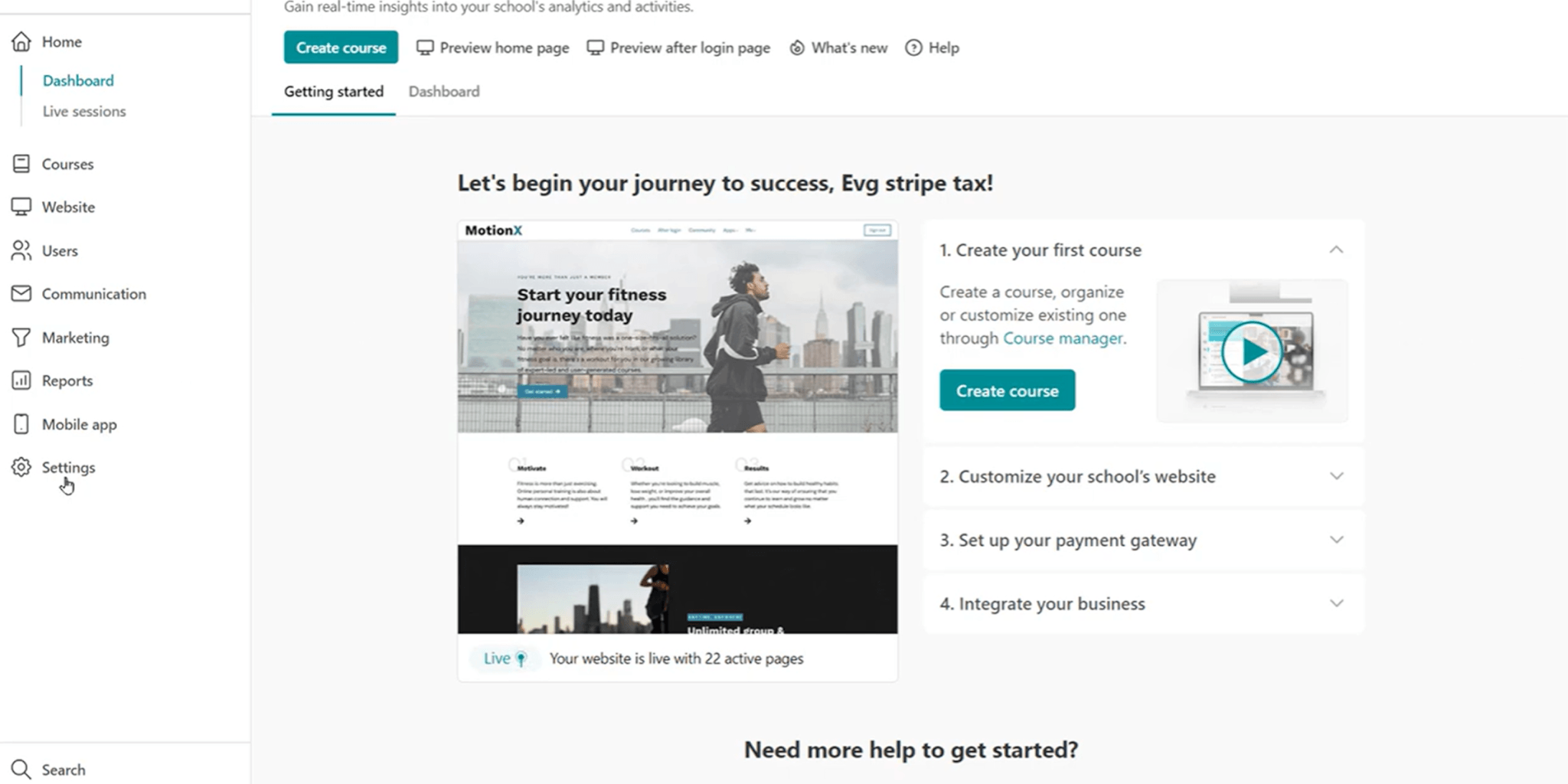
Enable Stripe Tax and configure jurisdictions where you’re registered to collect tax.
Step 2
Select product tax code for electronically supplied services (txcd_10000000).
Step 3
Inside LearnWorlds, go to Settings → Financial → Tax Management → Stripe Tax and activate.
Step 4
Taxes automatically show at checkout and are recorded consistently for reporting.
Typical setup time: ~10 minutes
Once you get an active and correctly configured Stripe account, enabling the tax calculation service in Stripe and configuring it in Learnworlds takes less than 10 minutes. Support articles: Step-by-step Stripe Tax setup | Stripe payment gateway
What LearnWorlds handles automatically
- Applies Stripe Tax behavior in LearnWorlds checkout once enabled
- Displays taxes in checkout based on settings
- Keeps transactions aligned in LearnWorlds reporting
- Minimizes ongoing manual tax handling
What your team configures
- Stripe Tax setup in Stripe (registrations, jurisdictions, product tax codes)
- Tax-inclusive vs tax-exclusive pricing decision
- Your compliance policy (where you must register/collect) + finance review
- Ongoing obligations: filing and remittance (handled by your finance/tax advisor)
“I love their customer support, which is top tier. I always receive quick replies, and they always solve my issues. When I first joined LearnWorlds, the platform was very simple to understand and get by. We’ve been going strong and love it!”

“I like that LearnWorlds provides me with a fully functional website where I can offer my students self-study resources and a community chat. The team is responsive and professional, and they really care about what they are doing.”
“I find the AI bot helpful as it gives answers to my questions and even generates pictures for problem-solving. The platform is easy to use, and I love the different ways a course can be customized and has so much interaction.”
“We get email prompts about enrollments, which is a wonderful experience, allowing us to welcome new people with ease. The hands-off experience lets me focus on chemistry, removing the technical hassle of enrolling people.”
“The platform has been easy to set up and navigate. Plus, the onboarding calls have been helpful and tech support is extremely responsive! I am so pleased So far, the tech support has been worth every penny I’ve paid!”
“The platform integrates our website, funnels, marketing, and learning system all in one place, which is super convenient. I also appreciate their regular updates and the support team, which is extremely responsive.”
“I like the sleek, modern, easy to configure aspect of the platform. It is very easy as an admin to to set up pages without using code. I also like the modern features – like lesson markers, ai, and reporting”
“It’s amazing compared to our old learning platform. Every time I think of something I’d love to be able to do, a quick search shows that it’s available, and over a year in, in still finding even more features.”
“The wide range of features, responsive support, and regular platform updates. The value is good for the price, especially considering the range of features, regular updates, and responsive customer support.”
“It’s just amazing to find an all-in-one platform that delivers such high quality, they’ve really raised the bar and I love not having to compromise on the product we deliver because of software limitations.”
“The platform is really configurable, giving us a huge amount of flexibility about how to lay out our course. It’s allowed us to deploy our course in a drip feed format, which is fantastic for our learners.”
“I am using LearnWorlds for long time and it give us interactive video features, quizzes, buttons, notes inside videos and many more. LearnWorlds provide all in one online course and its creation tools.”
“What I like most about LearnWorlds is how easy and intuitive it is to use. I also really like the possibility to customize the school and make it fit your own style and brand.”
“The site is very user friendly and easy accessible. UI/UX is wonderful. The onboarding was also very easy”
“There are a lot of unique and user friendly features. The system is very customizeable.”
Who uses Stripe Tax in LearnWorlds—and how

B2B training provider selling internationally (EU/UK + US)
A training company selling compliance training in multiple countries can automate VAT/sales tax calculations at checkout and reduce manual tax tracking.
- Create cleaner records for accountants
- Charge correct tax rates based on buyer location
- Reduce finance/admin load for multi-region sales

Course creator scaling globally
A creator expanding into taxable US states and international markets uses Stripe Tax to reduce uncertainty.
- Faster scaling without tax spreadsheets
- Automatic tax calculation at checkout
- Less manual work per transaction

Internal academy selling training (B2B invoices + VAT ID edge cases)
A business that sells training to companies needs predictable tax behavior and clean financial reporting.
- Fewer manual tax adjustments
- Consistent tax behavior across cohorts/regions
- Better reporting consistency for finance reconciliation
How LearnWorlds Stripe Tax compares to other LMS platforms
| Capability | LearnWorlds | Docebo | Thinkific | Teachable | Kajabi |
|---|---|---|---|---|---|
| Stripe Tax native integration |  Yes (all paid plans) | Yes (ecommerce add-on) | No (uses own tax layer) | No (own payments layer) | No direct Stripe Tax |
| Works with 3rd-party gateways (eg PayPal) | Yes, it works with PayPal, but Stripe and Shopify cannot live together on the same platform |  | | | N/A |
| Automatic VAT/GST/sales tax calculation | | | Yes (limited regions) | Yes (limited regions) | Limited |
| B2B VAT reverse charge / VAT ID verification | Yes (VIES workflow) Tax calculations: Full support Invoicing procedures: Coming soon | Partial | Not confirmed | Not confirmed | |
| Implementation complexity | Low (4 steps; buyer owns Stripe config) | Medium (add-ons/config) | Low but locked | Low but locked | High/manual |
| Additional cost | Stripe Tax fee (Stripe pricing) + LW included | Add-on cost | Platform fees | Platform fees | Quaderno/manual |
Have complex tax, VAT, or multi-region requirements? Book a technical demo.
Stripe Tax for LearnWorlds — FAQs
A Stripe Tax LMS integration connects your LMS checkout to Stripe Tax so taxes can be calculated and applied automatically at purchase.
It helps course sellers reduce manual tax rules across countries/states and keep cleaner transaction records. It’s especially useful when scaling into new regions with different VAT/GST/sales tax rules.
Enable Stripe Tax in Stripe first (tax settings + jurisdictions), then activate it in your LearnWorlds tax settings and run a test checkout to confirm tax display. Most of the “work” is configuring Stripe correctly, and then LearnWorlds mainly applies the tax behavior to your checkout flow.
Note: When Stripe Tax is enabled, checkout may require the collection of billing details to determine jurisdiction correctly. Check out the Financial Billing Details for additional information.
Yes. Stripe Tax can calculate tax for purchases made through PayPal in LearnWorlds, while PayPal remains the payment processor.
Stripe Tax is Stripe’s tax engine; Quaderno is a broader tax/invoicing platform. If you’re already using Quaderno for invoicing workflows and it’s working, there may be no reason to switch. If you want a Stripe-native path and simpler setup when selling courses globally, Stripe Tax is often the easier starting point.
Check all LearnWorlds integrations.
Stripe Tax is a paid Stripe product. Stripe publishes pricing separately, and your cost depends on your Stripe Tax usage.
So yes, using Stripe Tax (Stripe’s automated tax calculation and compliance service) generally costs extra. While LearnWorlds integrates with Stripe as a payment gateway to process payments, Stripe Tax is a premium service provided directly by Stripe, separate from standard payment processing fees.
- Standard Stripe fees: You pay standard Stripe processing fees (2.9% + $0.30 per sale).
- Stripe Tax costs: Stripe charges a separate per-transaction fee for automated tax calculation, in addition to the standard payment processing fee.
You will need to activate and pay for Stripe Tax through your Stripe Dashboard.
Stripe Tax is available throughout all LearnWorlds pricing plans.
Stripe Tax can calculate VAT based on the buyer’s location and your tax registrations. For EU B2B transactions, VAT handling may depend on VAT ID verification and your tax settings; EU VAT ID validation typically references VIES.
Learn how VAT works in LearnWorlds.
Refunds should reflect in your tax reporting logic so you don’t overstate tax collected for a period. While it isn’t possible to process refunds directly through your LearnWorlds school, if you are using Stripe Tax, you can easily handle this and refund a customer through your Stripe account.
It’s important to record the refund transactions within LearnWorlds as well, as this will trigger the reverse tax transactions in the Stripe Tax registry side (this option is not yet available through the Stripe Tax dashboard). This ensures that for transactions including taxes, when refunded, the respective tax amount will also be removed from the taxes you will eventually file to the respective tax authorities.
If Stripe doesn’t operate in your country, you can still take payments with alternative gateways:
- Use PayPal as your built-in payment gateway inside LearnWorlds (quickest fallback for many regions).
- Use Shopify as your payment gateway if you run checkout through a Shopify store (note: enabling Shopify means you can’t use the other built-in gateways at the same time).
- Use a different gateway by adding external payment links/buttons (custom buttons that point to your provider’s checkout URL).
Tip for global payments: If Stripe is available to you, it can also unlock additional local payment methods (eg Apple Pay / Google Pay and region-specific methods) via Stripe, so it’s worth checking Stripe availability in your market first.
Explore LearnWorlds payment options.
Published:
Last Update: