Table of Contents
Key takeaways
- Shopify is a powerful storefront, but not a course platform. For anything beyond basic content delivery, it needs a proper LMS behind it.
- LearnWorlds connects to Shopify natively as a payment gateway, giving you a complete stack with LearnWorlds handling the learning experience and Shopify processing payments.
- The real growth comes after the setup: bundling, upselling, and email automation are where the Shopify and LearnWorlds combination starts to compound.
Shopify is very good at selling things. It is not, by design, built to teach them. There’s no progress tracking, no certificates, no interactive video, no structured learning environment. So when course creators try to make Shopify do both jobs at once, they usually end up with a workaround that serves neither.
The better way to sell online courses on Shopify is to let each platform do what it was built for. An LMS like LearnWorlds handles the storefront, the course delivery, and the learning experience. Shopify handles the payment.
Why Shopify and an LMS are better together
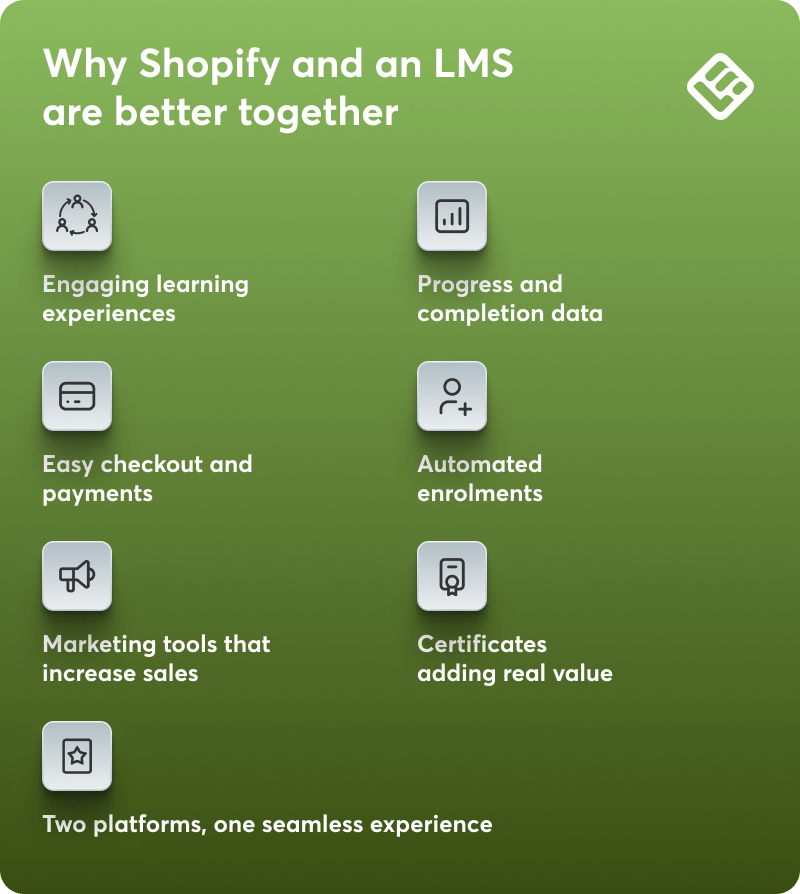
The first question most course creators ask is whether they actually need both platforms. It’s worth answering directly, because each tool has a distinct job, and understanding that split makes the rest of this guide easier to follow. The two platforms work best when each is doing the job it was built for.
What LearnWorlds does
LearnWorlds is a learning management system built for running a learning business end to end. That means more than just hosting courses:
- Branded learning environment and storefront
- Course creation tools: interactive video, SCORM, quizzes, eBooks, and surveys
- In-depth reporting: progress tracking, completion data, and course performance
- Certificates, assessments, and a built-in community
- Bundles, subscriptions, and flexible pricing models
- Marketing tools, affiliate programs, and integrations
- A white-label mobile app for iOS and Android (available as an add-on on Pro Trainer plans and above)
- AI powered tools
None of this exists in Shopify natively, and the Shopify apps that approximate some of it (Tevello, Courses Plus, Owwlish) are designed around the store, not the learner. They might work for simple course products but not when you’re building something more substantial.
What Shopify does
In the context of selling courses, Shopify’s value is specific:
- A checkout experience customers already recognise and trust
- Payment processing with broad global coverage
- A reliable infrastructure that handles the transaction so LearnWorlds can handle everything else
The case for both
LearnWorlds covers the full learning business: storefront, course delivery, and reporting. Shopify covers the payment. Each platform doing one job, and doing it well, is what makes the combination work.
Three options to connect Shopify and LearnWorlds
There are three options to connect Shopify and LearnWorlds. They differ in how central each platform is to the experience, and which one the learner interacts with first.
Option 1: Shopify as your payment gateway (recommended)
This is the native integration and the recommended setup.
LearnWorlds acts as your storefront and course platform. Shopify runs in the background as the payment engine. When a learner is ready to buy, they’re redirected to Shopify to complete checkout, then automatically enrolled in their course in LearnWorlds.
Courses sync directly from LearnWorlds to Shopify. No third-party automation needed. Multi-course cart checkouts, coupons, and automatic enrollment are all supported natively.
Best for: Course creators who want LearnWorlds as their primary platform, with Shopify handling payments in the background.
Option 2: Connect via Zapier or webhook
In this setup, Shopify is the front-facing store and LearnWorlds hosts and delivers the full course experience. The two platforms are connected via Zapier or a native webhook: when a purchase is completed in Shopify, enrollment in LearnWorlds is triggered automatically.
This option is more complex to set up than Option 1 and relies on a third-party automation layer. It’s the right choice if you’re already running an established Shopify store and want to keep it as your primary storefront, or if you need to set up the integration after January 1, 2026.
On lower Zapier plans, there can be a delay of up to 15 minutes between a completed purchase and a LearnWorlds enrollment. If immediate access matters, LearnWorlds’ native webhook is the more direct route.
Best for: Shopify-first creators who want the full LearnWorlds feature set but need to keep Shopify as their primary storefront.
Option 3: Shopify as your storefront with a course app
This approach keeps everything inside Shopify. Instead of connecting to an external LMS, you add a course delivery app directly to your store. Tevello, Courses Plus, and Owwlish are the main options.
Your courses sit alongside your other products, and learners access them without leaving your store.
The appeal: fewer platforms, no automation to configure, and a faster path to your first sale.
The tradeoff: neither app offers interactive video, SCORM support, white-label mobile apps, structured learning paths, or the reporting and certification tools that come with a proper LMS.
Best for: Creators with a small, simple course catalogue who want to sell courses on Shopify without introducing a second platform.
| Native gateway | Shopify app | Zapier or webhook | |
|---|---|---|---|
| Setup complexity | Medium | Low | High |
| Quality of learning experience | Full LMS | Basic | Full LMS |
| Third-party tools required | No | No | Yes |
| Custom app requirement | None | None | None |
| When it makes sense | You want the deepest learning experience with the least friction at checkout | Small catalog, keep it simple | Shopify is already your primary storefront |
Step-by-step: How to sell courses on Shopify with LearnWorlds
The steps below apply across all three connection options. Step 3 is the only one that differs depending on which setup you choose.
Step 1: Build your course in LearnWorlds
Create your course and keep it in Draft while you’re building. Draft mode keeps the course invisible and unpurchasable until you’re ready. When the content is complete, set the access type to Paid. This is also a good moment to configure any certificates, set completion conditions and drip-feeding schedule, and check that your course structure is sound.
Step 2: Create a product listing in Shopify
If you’re connecting the two platforms via Zapier, webhook or API, then you need to add your course as a product in Shopify. Write the sales copy, set your price, and add imagery that signals quality. This is essentially your sales page, so lead the description with the outcome, not the curriculum. The benefits for the learner should be clear.
Step 3: Connect the two platforms
How you do this depends on which option you’re using.For the native gateway (οption 1): In your LearnWorlds school, go to Settings → Financial → Payment Gateway, select Shopify, and follow the connection steps. Once connected, sync your courses from LearnWorlds to Shopify — they’ll appear automatically in your Shopify store.
💡For the full setup walkthrough, refer to our Shopify Payment Gateway support article or watch the video below:
For the Zapier or webhook (option 3): connect the two platforms via Zapier using “Order Paid” in Shopify as the trigger and “Enroll User in Product” in LearnWorlds as the action.
Step 4: Test the full learner journey
A broken onboarding experience is the fastest way to lose a learner. Before going live, place a test order in Shopify and follow the entire journey from the learner’s perspective:
- Does the enrollment appear in LearnWorlds immediately after purchase?
- Does the welcome email arrive, and does it contain the right login details?
- Is the course accessible and does the first lesson load correctly?
- If you set up a certificate, does it trigger at the right completion point?
Step 5: Build your email flows
Start with Shopify’s native post-purchase email to direct new students to their LearnWorlds school: one clear link, login instructions if needed, and a single prompt to get started. This email arrives when motivation to begin is at its highest.
From there, Klaviyo connects directly to Shopify to build automated sequences triggered by purchase behaviour. The three flows worth setting up from the start are:
- Abandoned cart: recovers prospective students who added your course to cart but didn’t complete the purchase
- Post-purchase nurture: keeps new students engaged in the first week, pointing them to key lessons and introducing the next course in your catalogue
- Win-back: targets learners who completed a course but haven’t purchased again, with a relevant next offer
Klaviyo pulls order and product data from Shopify, so these sequences can be personalized to what the student actually bought, not just a generic follow-up.
Scaling your course business with Shopify + LearnWorlds
Once the two platforms are connected and the first sale is in, the stack starts to earn its keep.
Bundle courses with physical products
Shopify handles physical and digital products in the same checkout, which opens up combinations a standalone LMS can’t replicate.
- A fitness brand selling a training program alongside a resistance band kit
- A cookery school bundling a course with a recipe book
- A professional training company pairing a certification with a printed workbook
The course and the product arrive in the same order, enrollment is triggered automatically, and the learner gets a more complete product from day one.
💡This applies primarily to Options 2 and 3, where Shopify is the storefront. In Option 1, LearnWorlds is the storefront.
Upsell from a single course to a bundle or higher tier
Shopify’s post-purchase upsell tools let you present a relevant offer immediately after checkout, before the student reaches the thank-you page, without asking them to re-enter payment details. For course creators, this is a useful mechanism for offering a related course or subscription-based online courses at a reduced price.
Third-party apps like ReConvert or AfterSell give you more control over how these offers are designed and when they appear. Both integrate directly with Shopify checkout and require no coding.
💡LearnWorlds subscription plans run through Stripe, not Shopify. If recurring revenue is central to your model, use Stripe as your LearnWorlds gateway and connect Shopify via Zapier as a storefront only.
Use completion data to improve what you sell
LearnWorlds tracks where learners drop off, assessments they pass, and lessons and courses they complete. Cross-referenced with Shopify’s sales data, you get the full picture: are the courses convert well the same courses that get completed?
What this looks like in practice
One of our customers, a yoga instructor selling online courses and a physical equipment kit, was running their store on Shopify but delivering courses through a basic video platform with no tracking and no automation.
After connecting Shopify to LearnWorlds, they bundled their course with their equipment kit, set up automated enrollment, and added a post-purchase upsell to their intermediate programme. Within a quarter, course completions were up, repeat purchases had increased, and for the first time they had data showing exactly where students were dropping off.
💡 Want to see how LearnWorlds handles the learning side? Start your 30-day free trial now.
LearnWorlds vs other options for selling courses on Shopify
LearnWorlds isn’t the only way to sell courses on Shopify, and it’s worth understanding how the options compare before committing to a setup.
One thing worth noting upfront: LearnWorlds is the only platform in this comparison that connects to Shopify natively as a payment gateway—no App Store app, no third-party automation.
Thinkific has a native Shopify App Store app, which is a simpler starting point, but it only supports free or one-time payment courses and users report recurring authentication and password sync issues.
| LearnWorlds | Thinkific | Teachable | Kajabi | Courses Plus | |
|---|---|---|---|---|---|
| Shopify App Store app | No | Yes (limited) | No | No | No |
| Native payment gateway integration | Yes | No | No | No | No |
| Connection method | Native gateway or Zapier/webhook | Native app or Zapier | Zapier | Zapier or Buy Button embed | Native |
| Setup complexity | Medium | Low–Medium | Medium | Medium | Low |
| LMS depth | Full | Mid-range | Basic | Basic | Minimal |
| White-label capability | Yes (Learning Center plan and above) | No | Growth plan and above | Growth plan and above | No |
| Pricing | From $29/mo | From $49/mo | From $39/mo | From $179/mo | From $29.99/mo |
LearnWorlds runs the learning business. Shopify handles the payment. Together they give course creators a complete stack without asking either platform to do a job it wasn’t built for.
If you’re ready to build it, start with a free LearnWorlds trial and connect Shopify in the way that works for your setup.
FAQs
Yes, but with limitations. Shopify handles the transaction side well (product pages, checkout, payments) but it has no native course delivery infrastructure. For basic course products, apps like Tevello or Courses Plus work within Shopify. For anything more substantial, like progress tracking, certificates, interactive video, or SCORM, you’ll need a dedicated LMS like LearnWorlds, which connects to Shopify natively as a payment gateway or via Zapier depending on your setup.
There are three options. The simplest is to add a course delivery app like Tevello or Courses Plus directly to your Shopify store. This s low setup, but limited in depth. The second is to connect Shopify as a payment gateway inside your LMS, so the LMS handles the storefront and delivery while Shopify processes payments. The third connects the two platforms via Zapier or webhook, with Shopify as the storefront and the LMS handling delivery.
No. Shopify has no native course delivery, progress tracking, certificates, or learning infrastructure. Third-party apps like Tevello and Courses Plus add basic course functionality within Shopify, but they are not a full LMS. For a proper learning management system, you need a dedicated platform like LearnWorlds connected to your Shopify store.
There are three options. The recommended approach is to connect Shopify as a payment gateway directly inside LearnWorlds—no third-party tools required. The second option uses Zapier, with “Order Paid” in Shopify as the trigger and “Enroll User in Product” in LearnWorlds as the action. The third uses LearnWorlds’ native webhook for instant enrollment without a third-party tool.
It depends on what you need. Thinkific has a native Shopify app, making it the simplest to connect. Teachable and Kajabi both integrate via Zapier. LearnWorlds offers the deepest learning infrastructure of the group (interactive video, SCORM, white-label mobile app, granular progress tracking) connected to Shopify via Zapier or native webhook. For course creators who prioritise learning experience alongside commerce, it’s the strongest combination.
Yes, using apps like Tevello, Owwlish, or Courses Plus, which add basic course delivery inside Shopify. For simple course products with straightforward content and no need for progress tracking, certificates, or interactive video, this can be enough. As your catalogue grows or your learning experience becomes more complex, the limitations of staying within Shopify become harder to work around.
It depends on your setup. Shopify plans start at $39/month (Basic), rising to $105/month (Grow) and $399/month (Advanced), with a 25% discount on annual billing. If you use a course delivery app within Shopify, Tevello costs $29/month, Owwlish $24/month, and Courses Plus starts at $29.99/month. If you connect a dedicated LMS like LearnWorlds, plans start at $29/month. Factor in transaction fees and any additional tools on top of that.
If courses are your core business, LearnWorlds. Shopify is a commerce platform that can sell courses but cannot deliver them properly. Essential features like progress tracking, certificates, and interactive video are missing. LearnWorlds is built specifically for course creators and handles all of that. The strongest setup uses both: LearnWorlds running the learning business, Shopify processing the payments. Find out more about LearnWorlds vs Shopify.

Androniki Koumadoraki
Androniki is a Content Writer at LearnWorlds sharing Instructional Design and marketing tips. With solid experience in B2B writing and technical translation, she is passionate about learning and spreading knowledge. She is also an aspiring yogi, a book nerd, and a talented transponster.
 Back to blog
 Scroll to top
FAQ
Everything you have ever wondered, but were too afraid to ask...

Related Articles